.NET is the platform beneath ASP.NET Core. It supplies fundamental libraries for tasks such as working with lists, dictionaries, and files. An ASP.NET Core application uses that foundation to run as an application with a web server that handles HTTP requests. section 2.2 section 1.6
The names mark different generations. .NET Core was the cross-platform successor to the Windows-only .NET Framework. After .NET Core 3.1 came .NET 5, then .NET 6 and .NET 7. “.NET 5+” refers to that unified generation; the “Core” name was dropped from the platform, but ASP.NET Core kept it. .NET shares many APIs with .NET Framework, yet it is a separate, more modular platform—not simply a fork. section 2.2
Figure 2.2 The relationships among ASP.NET Core, ASP.NET, .NET Core/.NET 5+, and .NET Framework. ASP.NET Core runs on .NET Core and .NET 5+, so it can run cross-platform. Conversely, ASP.NET runs on .NET Framework only, so it’s tied to the Windows OS.
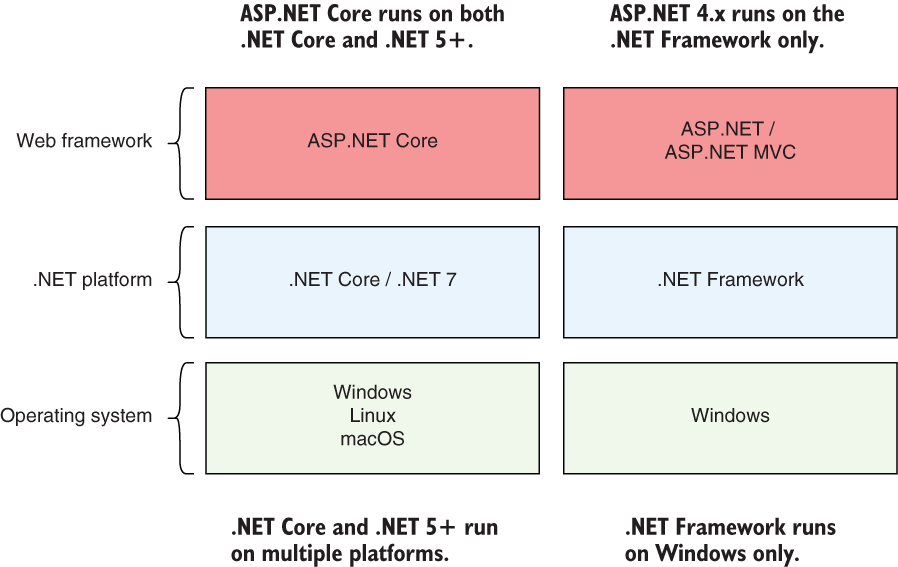
Use the platform diagram to distinguish ASP.NET Core running on cross-platform .NET from legacy ASP.NET running on Windows-only .NET Framework. section 2.2
Cross-platform does not mean every API works everywhere. ASP.NET Core applications can be developed and run on Windows, Linux, or macOS. If an application uses Windows-specific features such as the Registry or Directory Services through the Windows Compatibility Pack, those APIs remain available only when it runs on Windows. section 1.3 section 2.4.2
Figure 2.3 ASP.NET Core application model. The .NET 7 platform provides a base console application model for running command-line apps. Adding a web server library converts this model to an ASP.NET Core web app. You can add other features, such as configuration and logging, using various libraries.
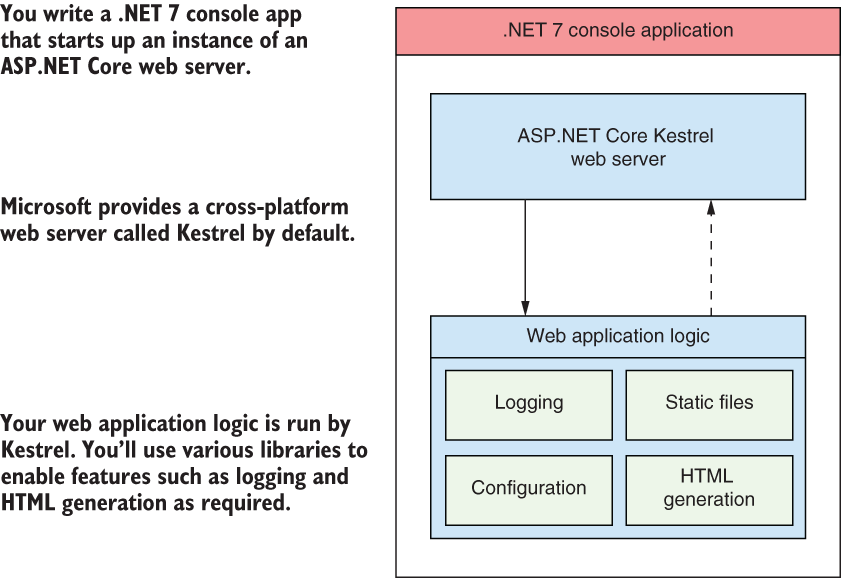
The application-model diagram shows how adding a web-server library turns a base .NET console application into a web application; other libraries can add configuration and logging. section 2.2
Start a .NET 7 web application
In Visual Studio, choose the C# ASP.NET Core Empty template, select .NET 7.0, and leave HTTPS enabled. Alternatively, use the .NET CLI: `dotnet new sln -n WebApplication1`, `dotnet new web -o WebApplication1`, then `dotnet sln add WebApplication1`. This creates a solution containing a minimal web project. For a starter website with Razor Pages instead, use the ASP.NET Core Web App template or `dotnet new razor`. section 3.2.1 section 13.1.1
For a new web application, ASP.NET Core on .NET 7 is the recommended direction over legacy ASP.NET on .NET Framework. For an existing application, check platform-specific dependencies before moving it: the ability to deploy on Linux does not carry Windows-only APIs along with it. section 1.6 section 2.4.2




