Runs compiled .NET applications after development and publishing are complete. Unlike the .NET SDK, it does not restore packages, build projects, or provide the development workflow. A published application can start with the dotnet app.dll command. section 27.1.1 section 27.5
Choose how the application obtains its runtime:
- Runtime-dependent deployment uses the installed .NET 7 Runtime, produces smaller output, and can run across Windows, Linux, or macOS without recompilation. section 27.1.1
- Self-contained deployment packages the .NET 7 Runtime with the application, avoiding dependence on the host installation but requiring a target-specific build. section 27.1.1
Run a published application
After publishing an ASP.NET Core application, deploy its output folder and run dotnet ExampleApp.dll. For a self-contained Windows deployment, publish with dotnet publish -c Release -r win10-x64 --self-contained -o publish_folder. Development commands such as dotnet run perform build-related work that production execution does not need. section 27.1.1 section 27.5
Figure 27.2 The bin folder for an ASP.NET Core app after running dotnet build. The application is compiled into a single .dll file, ExampleApp.dll.
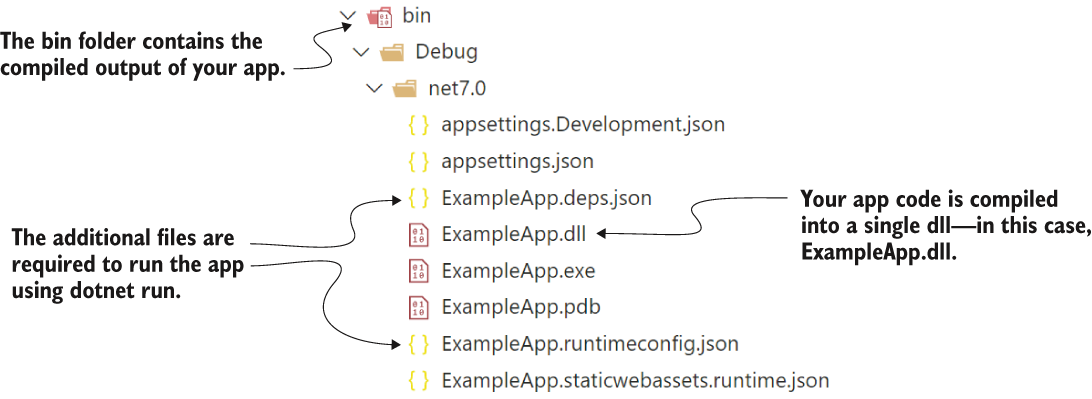
Inspect the compiled application DLL in the bin folder before publishing. section 27.1.1
On Windows, IIS can host an ASP.NET Core application through the ASP.NET Core Module. Install the Windows Hosting Bundle, configure a No Managed Code application pool, and deploy the published files with web.config. IIS can forward requests to the application as a reverse proxy. section 27.2.1 section 27.5


