liveBook · Manning

Network hop

As explained in Acing the CCNA Exam: Volume 1 Fundamentals and Protocols

A hop is one journey of a message from one network node to the next node along its path to a destination.

A network hop is one journey of a message from one network node to the next node along its path to a destination. Layer 2 provides hop-to-hop delivery, while Layer 3 provides end-to-end delivery. section 4.3.1 section 4.4

Three-hop journey

When PC1 sends a message to SRV1, the message makes three hops: PC1 to R1, R1 to R2, and R2 to SRV1. A switch may forward the message, but traveling through a switch does not count as a hop. section 4.3.1

At each hop:

  • Layer 2 addresses the message to the next node using that node’s MAC address. section 4.3.1
  • The destination MAC address changes for each hop, while the destination IP address remains the same from source host to destination host. section 4.4
  • Layer 3 selects the destination host, and Layer 2 forwards the message to the next node in the path. section 4.3.1 section 4.4
Figure 4.2 TCP/IP Layer 2. A message sent from PC1 to SRV1 takes three hops through the network: from PC1 to R1, from R1 to R2, and from R2 to SRV1. At each hop, the message is addressed to the next hop’s MAC address. A message traveling through a switch does not count as a hop.
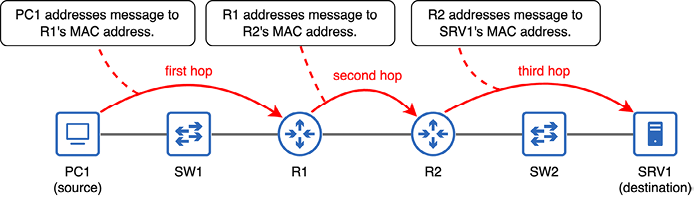
Trace the three-hop PC1-to-SRV1 path and see how each next hop is addressed. section 4.3.1


How Acing the CCNA Exam: Volume 1 Fundamentals and Protocols covers it

How deep it goes
Defines a hop, traces three forwarding steps, and distinguishes changing MAC addresses from persistent IP addressing.
Examples
Uses a PC1-to-SRV1 route through R1 and R2, emphasizing that switch forwarding does not add a hop.
What it assumes
Assumes basic network nodes and addresses, while defining hops, MAC addresses, and the Layer 2 and Layer 3 delivery distinction.
What you can do after
Evaluate a network path by counting node-to-node journeys and identifying the MAC address used at each hop.
How it connects
Connects hops with the Data Link Layer, MAC addresses, routers, switches, IP addresses, and end-to-end delivery.

Also explained in

Compare how 2 books explain network hop →

Related concepts

This explainer was generated by Manning's knowledge graph from the text of Acing the CCNA Exam: Volume 1 Fundamentals and Protocols. The section links point to the parts of the book it draws on.