A notification integration is a Snowflake object that interfaces with a third-party cloud message queuing service. It connects Snowflake pipelines to external event delivery: for Azure blob ingestion, an event notification reaches a storage queue, allowing Snowpipe to load newly arrived files automatically. section 5.3.2 section 5.5
Figure 5.3 Graphical representation of Microsoft Azure resources required to configure event grid messages. A storage account contains a storage container with data files, a message queue, and an event subscription subscribing to an event grid system topic. Loading a new file to the storage container triggers the "Blob Created" event. The event grid system topic sends it to the message queue.
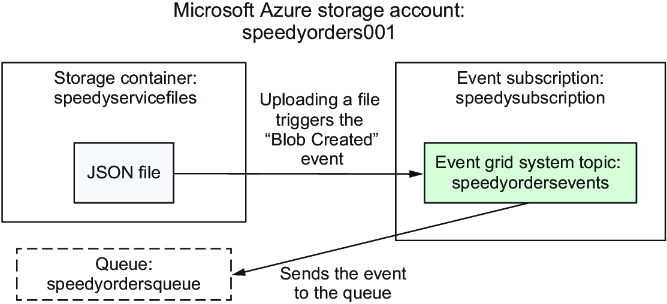
The Azure event path is storage container → Blob Created event → Event Grid system topic → storage queue. A notification integration connects Snowflake to that queue so Snowpipe can react to new files. section 5.3.1
For an Azure Storage Queue integration, gather the Azure tenant ID and storage queue URL, then create an enabled integration with type QUEUE and provider AZURE_STORAGE_QUEUE. Describe the integration afterward to obtain the Azure consent URL and multi-tenant application name needed for Azure authorization. section 5.3.2
use role ACCOUNTADMIN;
CREATE NOTIFICATION INTEGRATION SPEEDY_QUEUE_INTEGRATION
ENABLED = true
TYPE = QUEUE
NOTIFICATION_PROVIDER = AZURE_STORAGE_QUEUE
AZURE_STORAGE_QUEUE_PRIMARY_URI = 'https://speedyorders001.queue.core.windows.net/speedyordersqueue'
AZURE_TENANT_ID = '1234abcd-xxx-56efgh78';
This SQL creates an enabled Azure Storage Queue notification integration using the queue URI and tenant ID. After Azure authorization, grant USAGE on the integration to the role that creates the Snowpipe. section 5.3.2
Authorization and access are part of the setup:
- Run DESCRIBE NOTIFICATION INTEGRATION and provide the returned Azure consent information to an Azure administrator, who accepts the Snowflake service principal and assigns the Storage Queue Data Contributor role. section 5.3.2
- Grant USAGE on the integration to the role that will create the Snowpipe; the example grants SYSADMIN access for the exercise pipeline. section 5.3.2
- Configure the event subscription for Blob Created events, because Snowpipe loads files when new objects are added to blob storage. section 5.3.1
Notification integrations also support Snowflake email notifications. Create an enabled integration with type EMAIL, grant USAGE to the sending role, and call SYSTEM$SEND_EMAIL with the integration name, recipients, subject, and body. Recipients must be verified users in the same Snowflake account. section 13.2
Pipeline email notification
Create PIPELINE_EMAIL_INT as an EMAIL integration, grant it to DATA_ENGINEER, then call SYSTEM$SEND_EMAIL from that role. This pattern can notify a pipeline user and is later used from tasks. section 13.2
In production task pipelines, a notification integration can also be selected when configuring error notifications to a cloud messaging service. This makes failed task executions available to an external notification destination. section 13.5
