When Alice signs in, a password can be paired with a one-time code delivered by SMS, email, push notification, or an authentication app. The code acts as a temporary possession factor, intended for one use or a limited validity period, so a stolen password alone is less likely to grant access. section 3.6.3
One-time codes vary in security and usability by delivery method:
- SMS and email codes improve security over passwords alone, but require manual entry and can be compromised through phishing or SIM swapping. section 3.7.2
- Authentication-app codes are harder to intercept than SMS codes, but still require switching applications and manually transferring the code; phishing remains a major threat. section 3.7.2
- Push notifications remove manual code transfer, but attackers can exploit credential stuffing and MFA fatigue. section 3.7.2
Password plus an authentication-app code
During registration, Alice selects an authentication factor, and the authentication service securely binds it to her identifier. At login, she supplies her identifier, password, and the generated code before access is granted or denied. section 3.6.3
Figure 3.7 Identifier with authentication factors flow. During registration, Alice provides an identifier (such as a username or email) and one or more authentication factors (such as a password or biometric). The authentication service securely stores them. At login, Alice is prompted for her identifier and corresponding authentication factors. The service verifies both before granting or denying access. This is the most common authentication pattern, and it serves as the foundation for multifactor authentication, where the combination of factors improves security by requiring control over multiple types of evidence.
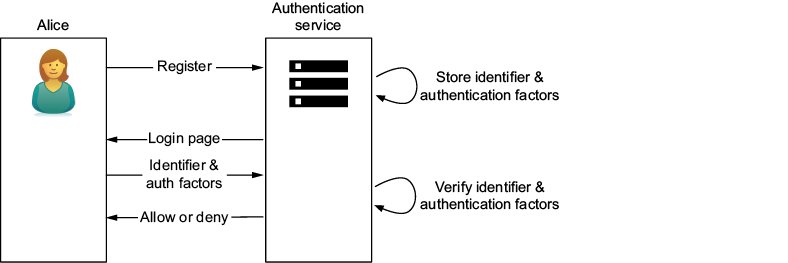
Follow the identifier-and-factor flow from registration and secure factor storage through login verification and the access decision. section 3.6.3


