OpenID Connect (OIDC) lets an application authenticate a user through an identity provider instead of storing the user’s credentials itself. Built on OAuth 2.0, it adds authentication, conventions, and discovery so the application can answer: “Which user sent this request?” section 25.1.3 section 25.7
From photo access to user identity
Imagine a photo-printing service requesting access to photos held by another service. With OAuth 2.0, the user signs in to the photo service, approves access, and the printing service receives an authorization code it can exchange for access. That grants permission to use the photos; it does not, by itself, tell the printing service who the user is. OpenID Connect follows a similar flow but adds an identity token describing the authentication event and a way to retrieve identity details. section 25.1.3
Figure 25.6 Using OpenID Connect to authenticate with Facebook and retrieve identity information. The overall flow is the same as with Oauth 2.0, as shown in figure 25.5, but with an additional identity token describing the authentication event and API call to retrieve the identity details.
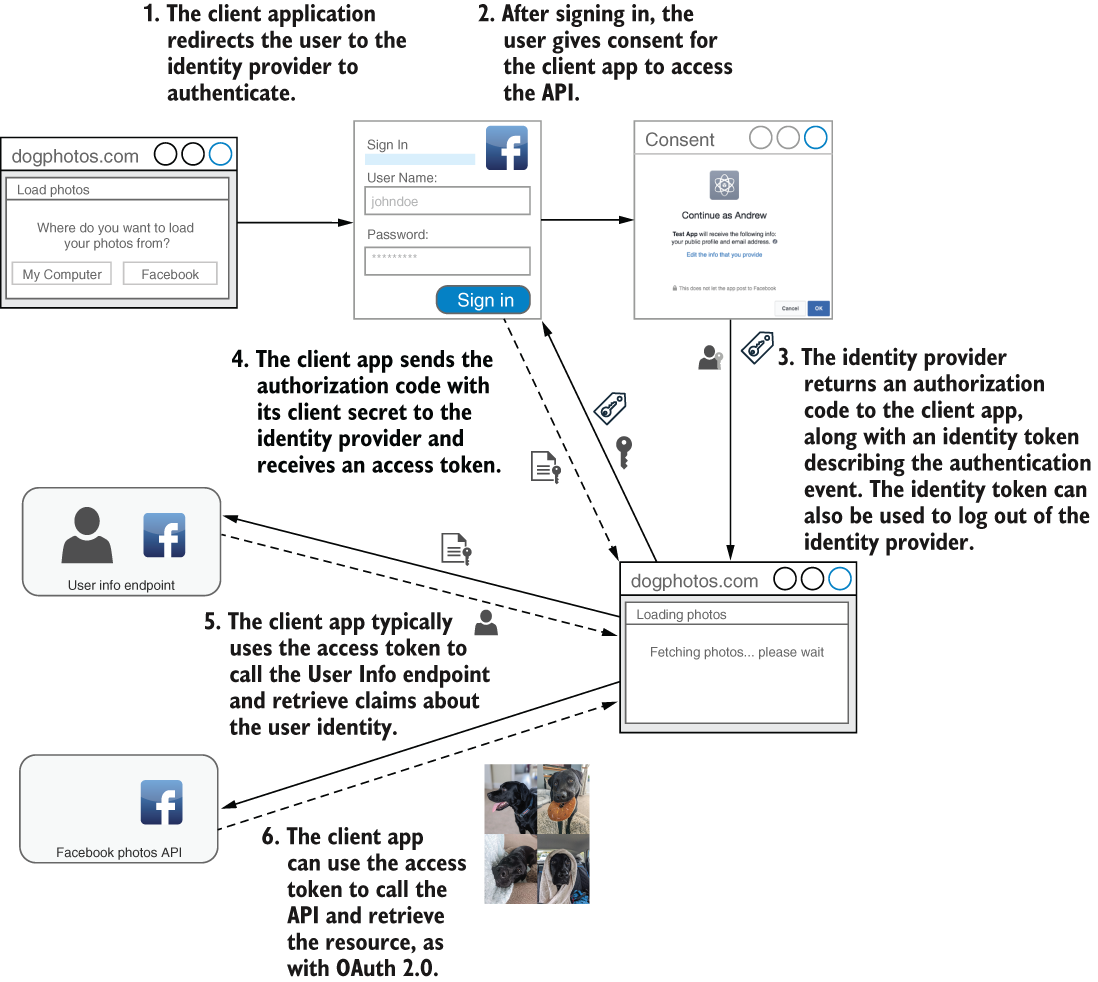
Compare the OpenID Connect flow with OAuth 2.0: the additional identity token and identity-details request are the important differences. section 25.1.3
In an ASP.NET Core API setup, keep the related pieces distinct:
- An identity provider can centralize authentication and user management across applications and APIs. A third-party provider is worth considering before building one yourself; IdentityServer and OpenIddict implement OIDC but leave user management and its UI to you. section 25.7
- APIs commonly receive bearer tokens formatted as JWTs. Validate a received JWT’s signature: its contents are readable by default, not encrypted. section 25.2 section 25.7
- For a browser-based app, a Backend for Frontend can handle OIDC sign-in, keep bearer tokens out of the browser, and use a cookie for browser requests. The tradeoff is an additional backend service. section 25.2
For API testing, an OpenAPI security scheme can describe OIDC. With that scheme configured, Swagger UI’s Authorize action can redirect to the identity provider and retrieve a token instead of requiring a pasted bearer token. The shown Swashbuckle listing configures simpler bearer authentication, not OIDC itself. section 25.5
Check redirect destinations during sign-in. OIDC flows may need to redirect outside the application, so a local-URL-only check will not always work; preregister allowed redirect URLs and use only those destinations. section 29.4.1












