OpenID Connect (OIDC) extends OAuth 2.0 so a .NET MAUI app can authenticate users through a web browser and obtain a token for protected API calls. section 8.1.2
The app sends users to an IdentityServer login page instead of collecting passwords. After login, the identity provider redirects back with a code that the client exchanges for a JSON Web Token. section 8.1.2
A practical MAUI integration uses these pieces:
- Configure the authority, client ID, scopes, and redirect URI in OidcClientOptions. section 8.1.2
- Use WebAuthenticator through a browser adapter to display the provider login page and parse its response. section 8.1.2
- Register the custom redirect scheme on Android, iOS, macOS, and Windows so the operating system returns the response to the app. section 8.1.2
Figure 8.3 Step 1: Call the LoginAsync method of the OidcClient package. Step 2: The OidcClient package will call WebAuthenticator and display the login page on IdentityServer. Step 3: The user will log in to IdentityServer. Step 4: IdentityServer returns the result via WebAuthenticator. Step 5: The parsed result is returned to OidcClient. Step 6: OidcClient extracts the JWT from the result and returns it to the caller of the LoginAsync method.
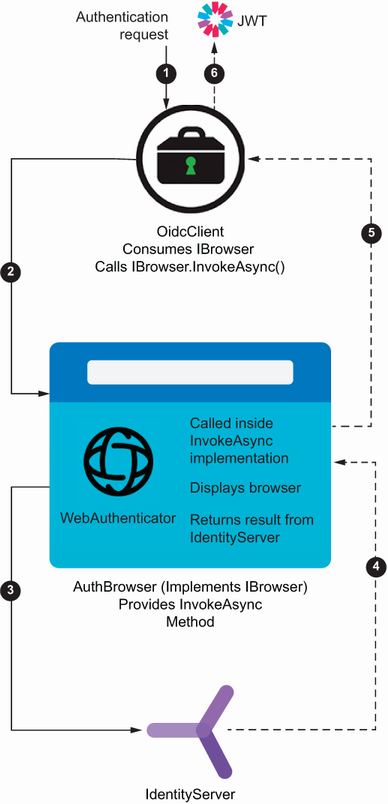
Trace the six-step login path from LoginAsync through WebAuthenticator and IdentityServer to the returned JWT. section 8.1.2












