liveBook · Manning

Outpainting

As explained in Generative AI in Action

Outpainting is an image-generation technique that extends an existing image beyond its original boundaries in a chosen direction.

Outpainting extends an existing image beyond its original boundaries in a chosen direction, allowing image-generation systems to create additional surrounding content. section 4.5 section 4.4

A practical outpainting workflow typically involves:

  • Open an image-editing workflow in Stable Diffusion. section 4.4
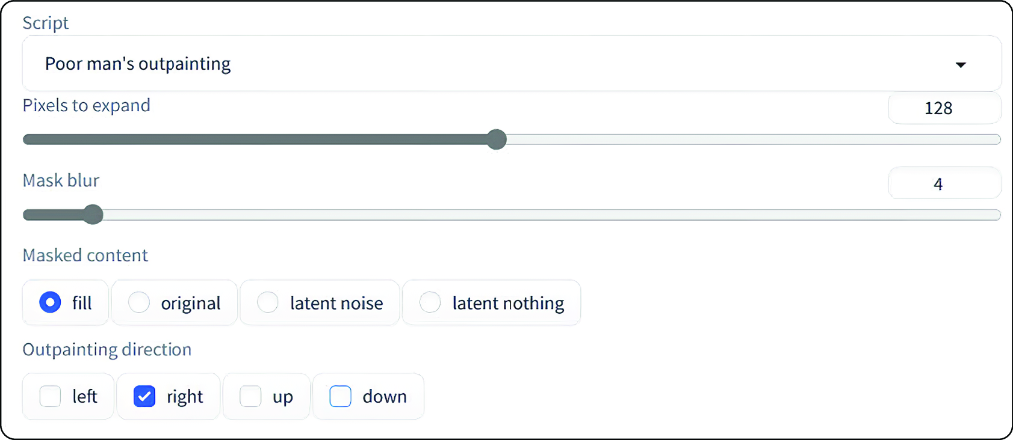
  • Choose the outpainting option through the Script dropdown. section 4.4
  • Select the direction in which the image should expand and generate the added content. section 4.4
  • Iterate with masking and regeneration when additional image edits are required. section 4.4

Extending an image

Use Stable Diffusion’s outpainting setting to expand an existing image beyond its original frame, then refine unwanted areas through masking and regeneration. section 4.4

Figure 4.16 Outpainting settings in Stable Diffusion
figure

Inspect the Stable Diffusion interface settings associated with outpainting. section 4.4

Stable Diffusion web UI supports self-hosting across Windows, Linux, and macOS, but its setup, configuration, and deployment details require separate treatment. section 4.4


How Generative AI in Action covers it

How deep it goes
Explains directional expansion and iterative masking, but defers Stable Diffusion setup, configuration, and deployment.
Examples
Uses Stable Diffusion’s Script dropdown, directional expansion setting, mask, and regeneration iterations.
What it assumes
Builds on image-editing concepts including inpainting, masking, and regeneration.
What you can do after
Operate outpainting through Stable Diffusion’s web UI and refine results using masking and regeneration.
How it connects
Connects outpainting with diffusion models, inpainting, image variations, and image-generation interfaces.

Also explained in

Compare how 2 books explain outpainting →

Related concepts

This explainer was generated by Manning's knowledge graph from the text of Generative AI in Action. The section links point to the parts of the book it draws on.