Outpainting extends an image beyond one or more of its existing edges. Instead of trimming content away as cropping does, it creates a larger canvas and generates new visual material that fits the original image’s perspective, style, and subject matter. The extension is meant to be a logical variation of what is already visible, not a repeated copy of it. section 6.8.1 section 7.8
Use outpainting when an image is too narrow, too short, or otherwise lacks room for a layout. It can widen a scene for a landscape-oriented web page, add sky above a subject, or extend foreground below it. This creates space while preserving the character of the original scene. section 6.8.1 section 7.8
A practical way to plan an outpainted image:
- Start with the finished placement in mind. Decide which edge needs more space and whether the result should be wider, taller, or expanded in several directions. section 6.8.1 section 7.8
- Check the focal point and composition. Outpainting can place a subject on a newly expanded rule-of-thirds grid rather than forcing the image to be cropped tighter. section 6.8.1 section 7.8
- Ask for content that belongs in the scene. A prompt can name a desired addition, such as a palm tree, while the generated area should still match the existing sand, shadows, sky, or other visual qualities. section 7.8
- Review the generated variations and select the one that looks visually continuous with the source image. The goal is an original extension that blends in rather than an obvious duplicate. section 7.8 section 7.9
Example: widening a beach scene
To make a beach image fit a wider page area, extend its left edge, right edge, or both. The added area can continue the beach with varied sand, shadows, and possibly new scene details rather than duplicating an existing cloud or object. Extending upward can add more sky; extending downward can add foreground. section 7.8
Outpainting and cropping solve opposite composition problems. Cropping removes edges to reframe an image, alter its aspect ratio, improve balance, or emphasize a focal point. Outpainting retains the original image and grows it outward, making it useful when removing visual information would be counterproductive. section 6.8.1 section 7.9
Figure 6.7 Composition is improved if you put the focal point(s) on grid lines or intersections. (Photo courtesy of Midjourney)
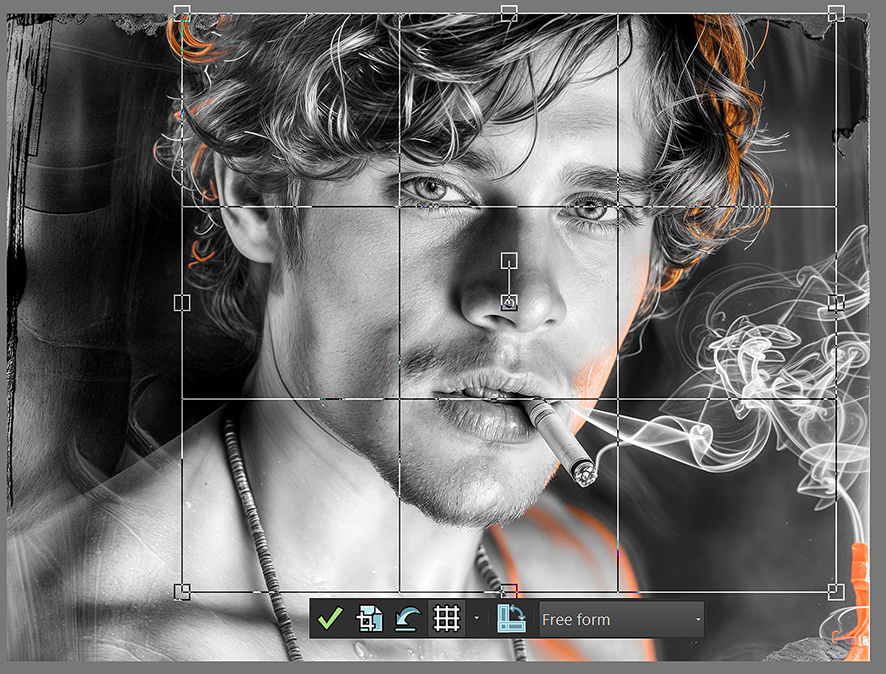
Use the rule-of-thirds grid to judge whether expanding the canvas could give a focal point a stronger position without cutting away useful image content. section 6.8.1
Outpainting is an AI-enabled technique: the system invents content beyond the original view by interpreting what plausibly belongs there. Treat its results as choices to evaluate against your design goal, since visual continuity, composition, and the finished page still require human judgment. section 7.8 section 7.9

