An overview gives people their bearings before asking them to investigate. For interactive visualizations, the useful rhythm is: overview first, zoom and filter next, then details on demand. section 7.2.1
A practical overview workflow:
- Show the broad structure and key takeaways so users understand what they are seeing. section 7.2.1
- Let users zoom or filter away distractions while preserving enough context for comparison. section 7.2.1 section 9.2.2
- Offer drill-down details only after users have selected what deserves closer inspection. section 7.2.1
From statewide risk to one community
A drought-risk dashboard starts with a scatterplot showing overall risk against a selectable risk factor. Users can filter their focus, select a census tract, and open a map showing its location. A KPI dashboard applies the same pattern with overview cards, metric-specific breakdowns, and small multiples that retain the unsliced total for context. section 7.2.1 section 9.2.2
Figure 9.8 When asked to use someone else’s suboptimal design, I gave the client what they requested, but then, on the side, I whipped up a quick wireframe of something I thought would satisfy their needs better: a dashboard following the visual information-seeking mantra of overview first (top), then zoom and filter (lower left), then details on demand (lower right).
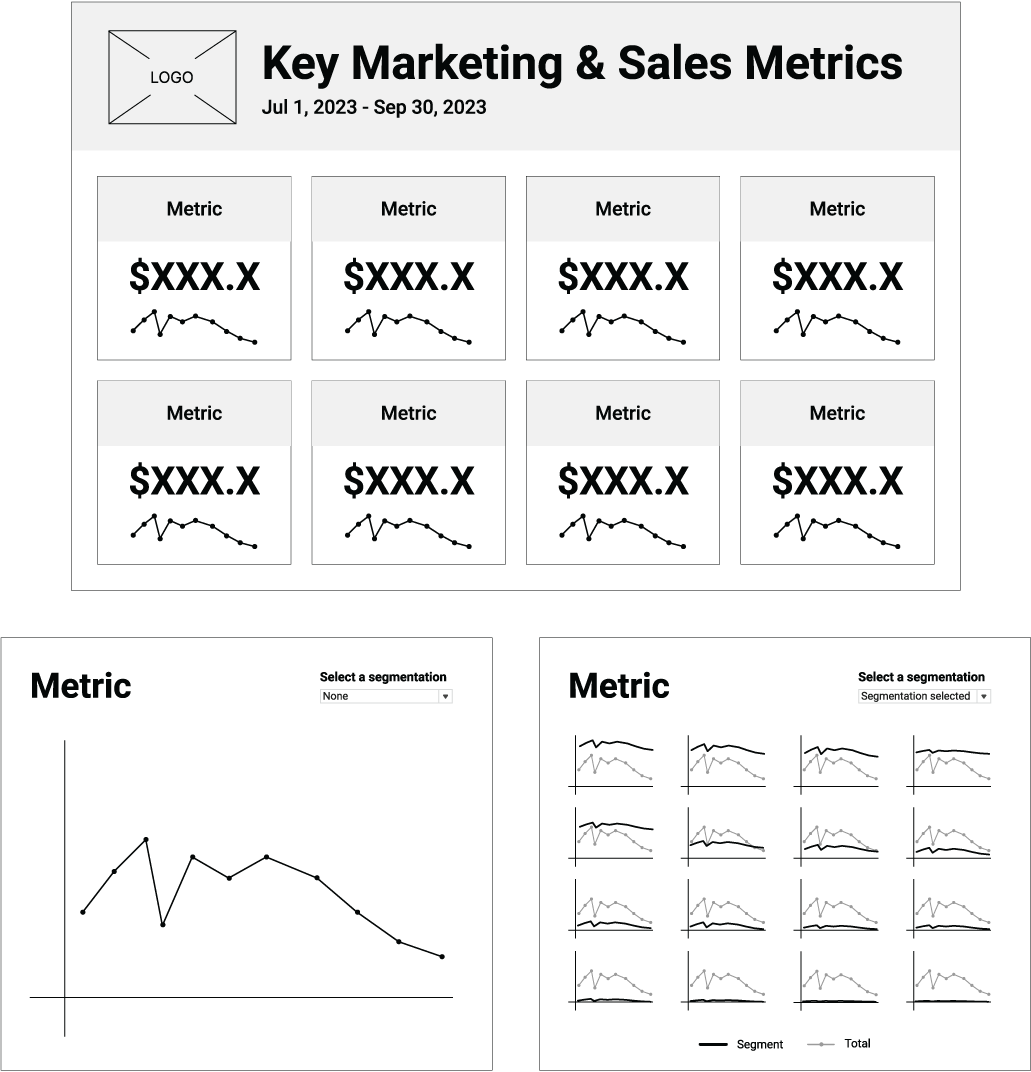
Use the wireframe to compare the three stages spatially: overview at the top, zoom and filter at lower left, and details on demand at lower right. section 9.2.2
