A p-chart monitors the proportion of defective items in successive samples. Each item is classified as defective or nondefective; plotting the sample proportions against control limits helps reveal unusual variation, shifts, or trends. It is especially useful when sample sizes change. If every sample has the same size, an np-chart of defective-item counts may be simpler. section 14.2.1 section 14.2
For each sample, calculate its point and limits:
- Divide defective units D by inspected units n to obtain the plotted proportion, p = D/n. section 14.1.6
- Calculate the center line, p̄, from total defective units divided by total inspected units. The standard deviation for a sample of size n is √[p̄(1 − p̄)/n]; larger samples have less variation in their proportions. section 14.1.3
- Set the upper and lower control limits to p̄ + 3σ and p̄ − 3σ for each sample. Because σ depends on n, the limits can change from point to point. section 14.2.1 section 14.1.3
Plot defective orange-juice cans by batch
Suppose `oj` is a pandas DataFrame with one row per batch and columns `sample`, `D`, and `size`. Compute the batch proportions and size-specific limits, then plot them: ```python import numpy as np import matplotlib.pyplot as plt oj['proportion'] = oj['D'] / oj['size'] p_bar = oj['D'].sum() / oj['size'].sum() oj['sigma'] = np.sqrt(p_bar * (1 - p_bar) / oj['size']) oj['UCL'] = p_bar + 3 * oj['sigma'] oj['LCL'] = p_bar - 3 * oj['sigma'] plt.plot(oj['sample'], oj['proportion'], marker='o', label='Proportion defective') plt.axhline(p_bar, color='r', linestyle='--', label='Mean') plt.plot(oj['sample'], oj['UCL'], 'g--', label='UCL') plt.plot(oj['sample'], oj['LCL'], 'g--', label='LCL') plt.xlabel('Sample') plt.ylabel('Proportion defective') plt.legend() ``` The supplied plotting example instead uses the unweighted mean of batch proportions for `p_bar`; that differs from total defects divided by total inspected units when batch sizes vary. Check which center-line calculation is being used before interpreting the limits. section 14.2.1 section 14.1.3
Figure 14.1 This p-chart illustrates the proportion of defective units in each sample of orange juice cans, with the dashed line across the middle representing the mean proportion. The dashed lines at the top and bottom indicate the UCL and LCL, providing boundaries for expected variation in the process. Data points within these limits suggest that the process is in control, and any points outside these limits would signal potential issues requiring investigation.
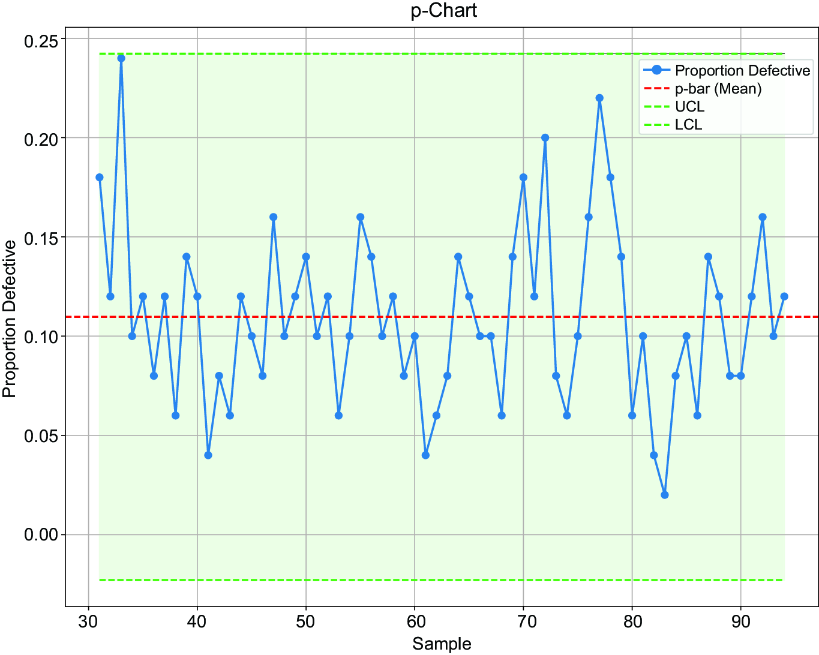
The plotted batch proportions sit against a mean line and upper and lower limits. Points outside the limits warrant investigation; points within them suggest the process is in control. section 14.2.1
