A pack layout is a hierarchical layout algorithm that turns aggregated node values into nested circles. D3’s pack() generator calculates each node’s radius, horizontal position, vertical position, depth, and related data. section 11.2.1
Build a pack layout progressively:
- Calculate node sizes with root.sum(d => d.total_speakers), selecting the value used for leaf radii. section 11.2.1
- Configure pack() with the chart size and 3-pixel padding, then pass the root hierarchy to the generator. section 11.2.1
- Bind descendants to SVG circles and set cx, cy, and r from the generated x, y, and r properties. section 11.2.2
- Use depth and an ordinal color scale to distinguish language families, branches, and leaf languages. section 11.2.2
Language-family circle pack
An 800-by-800 visualization represents languages hierarchically: the outermost node contains language families, branches sit inside families, and individual languages appear as leaves. Family circles receive categorical colors, while branch circles use lighter variations. section 11.2.1 section 11.2.2
Figure 11.5 To create a circle pack visualization with D3, we start with hierarchical data, often named root. To compute the layout, we call the root sum() method to calculate the size of the circles. Then we pass the root data structure to D3’s pack() layout generator. This generator appends each circle’s position and radius into the data. Finally, we append circles to an SVG container and set their position and size with the appended data.
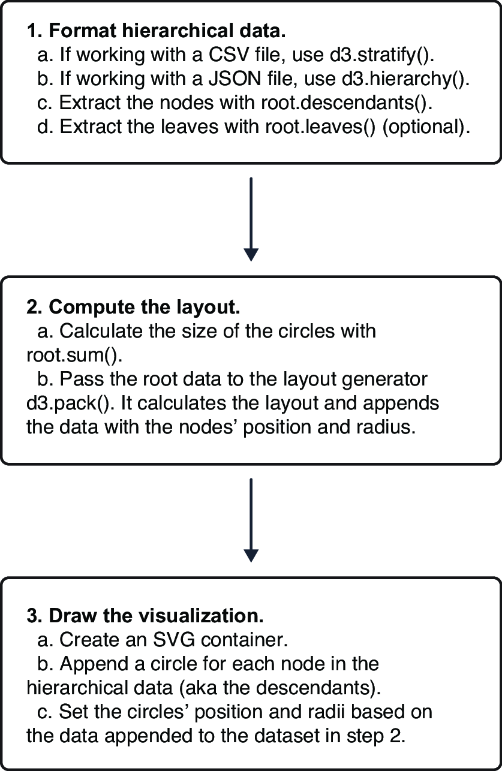
Follow the complete pipeline from hierarchical root data through sum(), pack(), generated geometry, and SVG circles. section 11.2.1
