A circle pack shows a hierarchy as nested, non-overlapping circles. The outer circle is the root; each enclosed circle is a child node. Parent-child relationships are communicated through enclosure, while leaf-circle size can represent a chosen value. section 11.0 section 11.2
Figure 11.1 In hierarchical visualizations, the parent-child relationship can be communicated via enclosure (e.g., a circle pack or a treemap), connections (e.g., a tree chart), or with adjacency (e.g., an icicle chart).
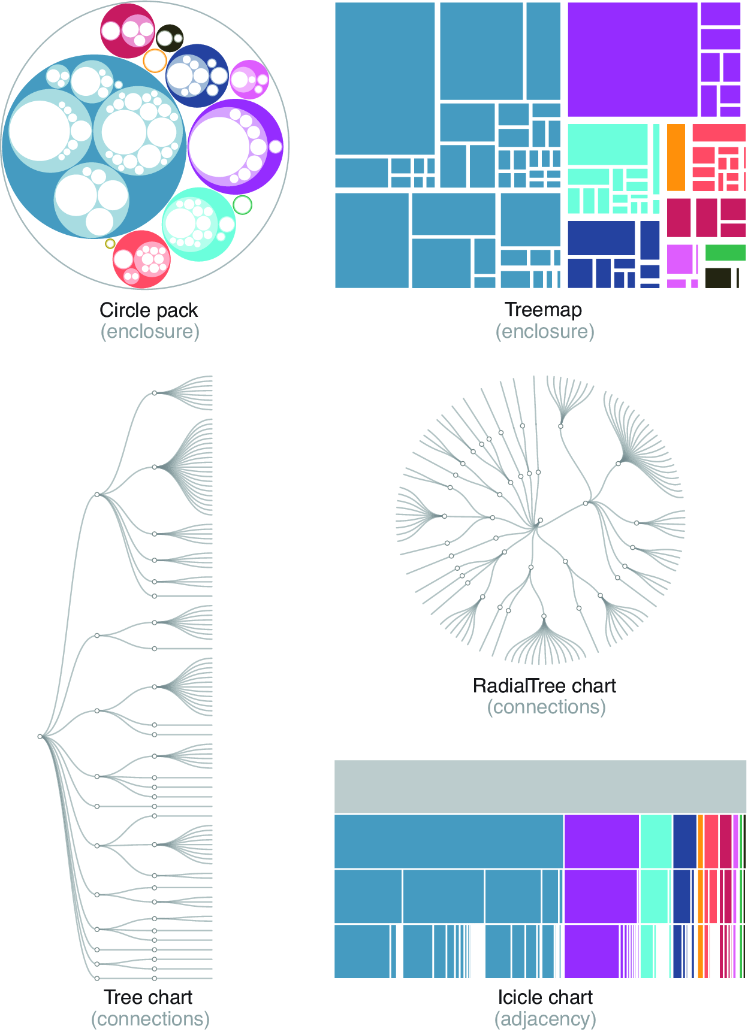
Compare enclosure with the connection-based tree chart and adjacency-based icicle chart when choosing how to show a hierarchy. section 11.0
Circle packs work well for taking in an overall hierarchical organization at a glance. They are visually approachable, but they use space less efficiently than treemaps and become hard to label when many circles are small. section 11.2 section 11.2.3
Build a D3 circle pack in this sequence:
- Create a hierarchical root from CSV with child and parent columns using d3.stratify(), or from nested JSON using d3.hierarchy(). Obtain all nodes with descendants() and leaf nodes with leaves(). section 11.5
- Call root.sum() with the leaf value to aggregate circle sizes, then configure d3.pack() with the chart size and padding. section 11.2.1
- Run the layout generator on root. It adds each node’s depth, radius, and center coordinates (x and y). section 11.2.1
- Bind descendants to SVG circles and set cx, cy, and r from the generated layout values. section 11.2.2
- Use an ordinal color scale to distinguish first-level groups, and lighter related colors for the next level if useful. section 11.2.2
- Label only circles above a minimum radius; use mouse interaction to reveal details for smaller leaf nodes. section 11.2.3
Languages by family and branch
A language hierarchy can place “Languages” at depth 0, language families at depth 1, branches at depth 2, and individual languages at depth 3. Leaf circles encode total speakers; family circles receive distinct colors, while hovering a language reveals its name, branch, family, and speaker count. section 11.2 section 11.2.2 section 11.2.3
For multiline labels inside circles, SVG foreignObject can contain ordinary HTML div elements. This allows long names to wrap, but limiting labels to larger circles preserves readability. section 11.2.3
