A tree chart visualizes parent-child relationships through connected nodes. It can run left to right, top to bottom, or radially; linear layouts are easier to read, while radial layouts save space. section 11.0
In D3, begin with hierarchical data called root. The tree layout calculates positions for every node, then SVG elements render the links, circles, and labels. section 11.3.1 section 11.5
Build a tree chart progressively:
- Create the layout with d3.tree().size([innerHeight, innerWidth]) and pass root to the generator. Reverse the dimensions when deploying from top to bottom. section 11.3.1
- Append an SVG container and translated group, then use d3.link() with curveBumpX to draw paths from root.links(). section 11.3.2
- Bind descendants to circles positioned by x and y. Size leaf circles with a radial scale and color them by their language family. section 11.3.2
- Bind descendants to text elements, positioning labels differently for parent and leaf nodes. section 11.3.2
Languages tree chart
A language hierarchy starts with the root “Languages,” branches into language families, divides into language branches, and ends with individual languages. Circle size represents total speakers, while color represents language family. section 11.3
Figure 11.11 To create a tree chart with D3, we start with hierarchical data, often called root. To compute the layout, we pass the root data structure to D3’s tree() layout generator. This generator appends the position of each node to the data. Finally, we append links, nodes, and labels to an SVG container and set their position and size with the appended data.
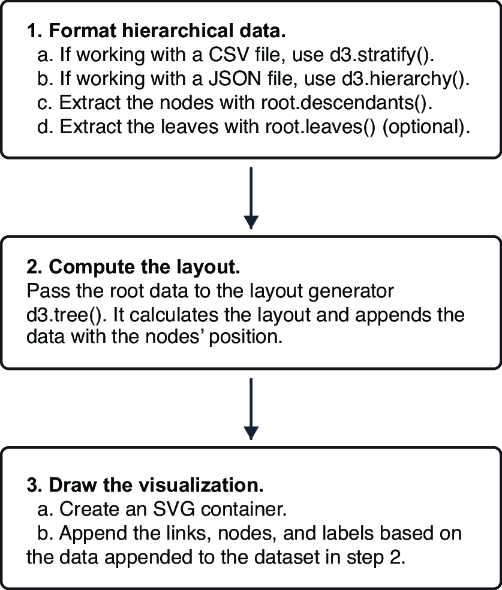
Follow the data-to-layout-to-SVG pipeline: hierarchical root data enters tree(), which appends node positions before links, nodes, and labels are drawn. section 11.3.1
