Pair programming puts two developers on one task through a shared workstation or online collaborative IDE. In the common driver–navigator style, the driver writes code while the navigator reviews it in real time; both communicate continuously and switch roles often. section 11.0
Pairing complements rather than replaces code review. It catches bugs, edge cases, unclear logic, and poor designs earlier, while a pull request records rationale, shares changes with the wider team, and supplies fresh perspective. section 11.1 section 11.1.2
Choose the arrangement and cadence that fit the people, task, and team:
- Start with driver–navigator pairing, especially for a first trial; consider comparable skill levels and compatible personalities. section 11.2.2
- Use driving school when the pair has agreed on a solution and tactical, detailed navigator instructions are useful. section 11.2.2
- Try Pomodoro intervals or other styles such as tour guide, ping-pong, and tag-team when the task or team calls for them. section 11.2.2 section 11.3
- Introduce pairing in small doses, such as an hour or a small task per sprint, then assess whether it improves the team’s process. section 11.2.2
- Give both developers clear screen visibility, accessible input devices, a focused workspace, and shorter sessions rather than forcing an entire workday. section 11.2.3
Use pairing to address a real team problem
A team working on legacy code can pair an experienced developer with a newer colleague using a tour-guide approach. The newcomer navigates the codebase, asks questions, and learns its quirks before participating in reviews. A team facing repeated rework can instead trial pairing during the next sprint to surface design problems earlier. section 11.1.1 section 11.2.1
Figure 11.1 A comparison of pair programming to code reviews
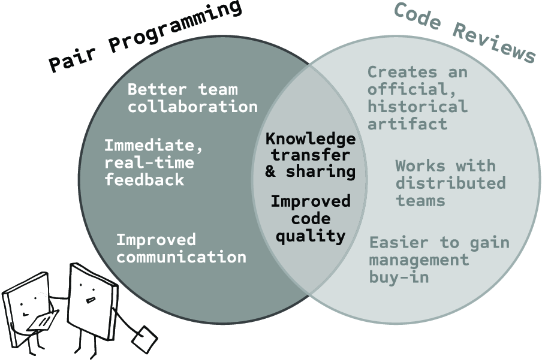
Compare the distinct contributions of pair programming and code reviews when deciding whether to use one or both. section 11.1