A portfolio page is your creative work’s online showcase: a place to present projects, achievements, personality, and talents to people who may hire you, buy your work, or simply enjoy it. Unlike a social-media profile, it gives you control over how your work and message appear. section 20.0 section 20.1
Plan the page in small, friendly steps:
- Sketch the layout on paper before writing HTML or CSS; treat the sketch as a blueprint. section 20.2
- Choose typefaces and colors that support the way you want the page to feel. section 20.2 section 20.0
- Build the page section by section, adding text, tags, and properties from a basic HTML skeleton. section 20.5
- Finish with contact information, a footer, and links that help visitors explore or reach you. section 20.2 section 20.38
The five-box idea
Imagine one large introduction box followed by four smaller boxes containing portfolio images. Around them, add a header with a logo, title, and section links; an about section; contact information; and a footer with copyright and social-media links. section 20.2
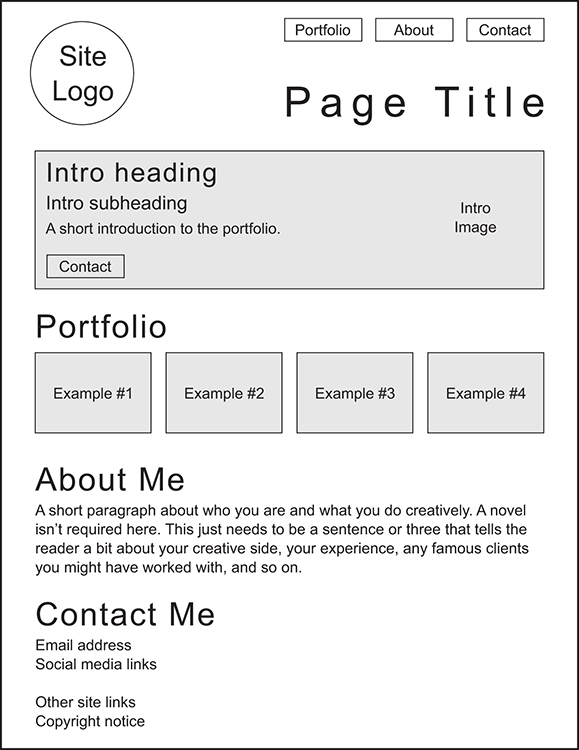
Use the layout figure as a quick visual blueprint before arranging the page’s introduction, work samples, about section, contact area, and footer. section 20.2
A finished portfolio page can be a strong starting point for sharing creative work online. Try improving it for smaller screens: the desktop design needs media-query breakpoints to remain usable on smartphones. section 20.47

