A portfolio page is your own small corner of the web for showing creative work to people who might buy it, hire you, or simply admire your side projects. Unlike a social-media profile, it gives you control over the message, the look, and which work gets the spotlight. Think of it as the online version of the physical portfolio artists once hauled from meeting to meeting—only much easier on the shoulders. section 20.0 section 20.1
Start with a sketch before writing HTML or CSS. A simple five-box arrangement uses one large introductory area followed by four smaller work images. The planned page includes a header with logo, title, and links; an introduction; the work itself; an about section; contact details; and a footer. The sketch is a blueprint, not a museum piece: pencil lines are perfectly qualified for the job. section 20.2
Figure 20.1 Before you start slinging HTML and CSS, draw up a quick sketch of the page layout and content.
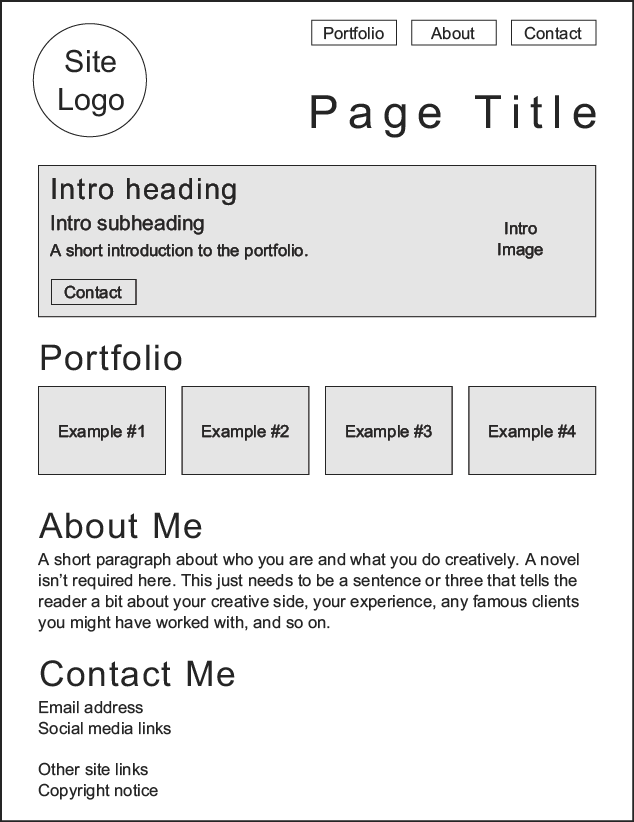
Use this layout sketch to map page sections and content before building the interface. section 20.2
Build the page in manageable layers:
- Create the semantic HTML skeleton: header, main content divided into sections, and footer. Put a logo, navigation links, and page title in the header; add copyright and social links in the footer. section 20.5
- Center the content with CSS Grid, then use a Flexbox column for the page content. Flexbox also arranges header pieces and the row of portfolio images. section 20.5
- Give visitors a quick introduction and a clear contact route. Use in-page links to move from the header navigation to portfolio, about, and contact sections. section 20.2 section 20.5
- Let the work do some showing off: display recent projects as images, and use an overlaid image with an opacity transition to reveal an after version on hover or tap. section 20.5
A restoration portfolio
A book-restoration page opens with a short pitch and a contact button, then presents four projects as before-and-after images. An About Me section establishes the restorer’s experience, while the contact area supplies an email address and social-network links. The content is ordinary HTML sections; CSS supplies the centered layout, colors, type, buttons, and image reveal. section 20.5
Choose typefaces and colors early, then add the text and images that support the story your work tells. A polished portfolio is not merely a gallery of files: it gives each visitor enough context to understand the work, enough background to trust you, and an obvious way to get in touch. section 20.0 section 20.2

