Postexecution is the project phase after completion. It closes the work by recognizing contributors, checking results against success measures, maintaining operations, addressing technical debt, and capturing learning for future projects. section 10.1.5 section 10.3
Use postexecution to turn a completed project into evidence and improvement:
- Recognize team members and value their contributions. section 10.1.5
- Measure success against predefined metrics, including timelines, budget, ROI, customer satisfaction, employee satisfaction, product usage, code quality, and operational stability. section 10.1.5
- Review operational maintenance and technical debt so the delivered product remains reliable and maintainable. section 10.3
- Run a retrospective to identify problems, preserve useful learning, and support continuous improvement. section 10.1.5 section 10.3
Project Accessible
Project Accessible met its requirements and timelines while staying within budget. Initial sales exceeded expectations, customer satisfaction reached 95/100, and employee satisfaction reached 70%, revealing both strong reception and opportunities for improvement. section 10.1.5
Figure 10.5 Sample retrospective board for Project Accessible
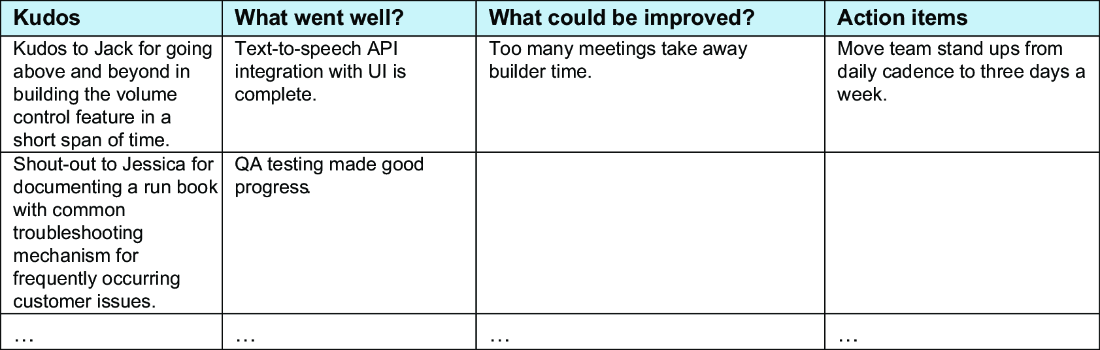
A retrospective board helps teams organize observations and convert project experience into improvement actions. section 10.1.5
Table 10.2 Different severity levels for trouble tickets
|
Severity 1
|
This level occurs when the business is affected. Everyone should stop working on anything else and focus entirely on fixing this problem as soon as possible. The blast radius, in this case, can be that each company customer is affected. Examples: order drops or a security breach of customer data. SLA can be turnaround of four to six hours.
|
|
Severity 2
|
This level is critical and needs immediate attention, but the blast radius, such as the number of customers affected, may be smaller (with perhaps 40% of customers affected). Example: during the order checkout, the applying code option is broken, so any customer with a discount code cannot use it and hence needs to pay the total price-. This example isn’t a happy customer experience, right? SLA in this case can be 24 hours.
|
|
Severity 3
|
This level is not as critical as the preceding two. On-call support can take one to two days to triage the problem and get back. Example: an application needs to go through a security review before launch. Because the service has not been launched, no production effect occurs, so the SLA is two business days.
|
|
Severity 4
|
This level is not urgent and can wait. It has the least priority for the on-call team and will be addressed when trouble tickets of higher priority are addressed. Example: a marketing manager requests access to your internal platform to show sale numbers. In this case, SLA can be in days, such as five business days.
|
Severity levels help teams prioritize operational problems after delivery according to business impact, affected customers, and response expectations. section 10.1.5
