A pyramid plot compares two distributions side by side with opposing or adjacent shapes. Its two vertical histograms stand back-to-back, making category differences visible across shared brackets. section 6.0 section 6.3
Build a pyramid plot by following these implementation choices:
- Group values into equal-width bins, generating separate bins for each category with d3.bin(). section 6.3
- Reserve opposing halves of the horizontal axis for the two categories, using separate horizontal scales when useful. section 6.3
- Draw bars whose lengths represent counts or percentages within each bracket; use lollipops or dumbbells as alternatives. section 6.3
- Share a vertical axis for the measured brackets, such as salary ranges or age groups. section 6.3
Salary distribution
A salary pyramid uses purple bars for women and orange bars for men. The vertical axis spans $0 to $240K, while opposing horizontal scales show each group’s percentage within salary brackets. section 6.3
Figure 6.9 Pyramid charts of the age distribution of women and men in Canada in 2021. The chart on the left uses bars to visualize the data, while the chart on the right uses lollipop or dumbbell shapes.
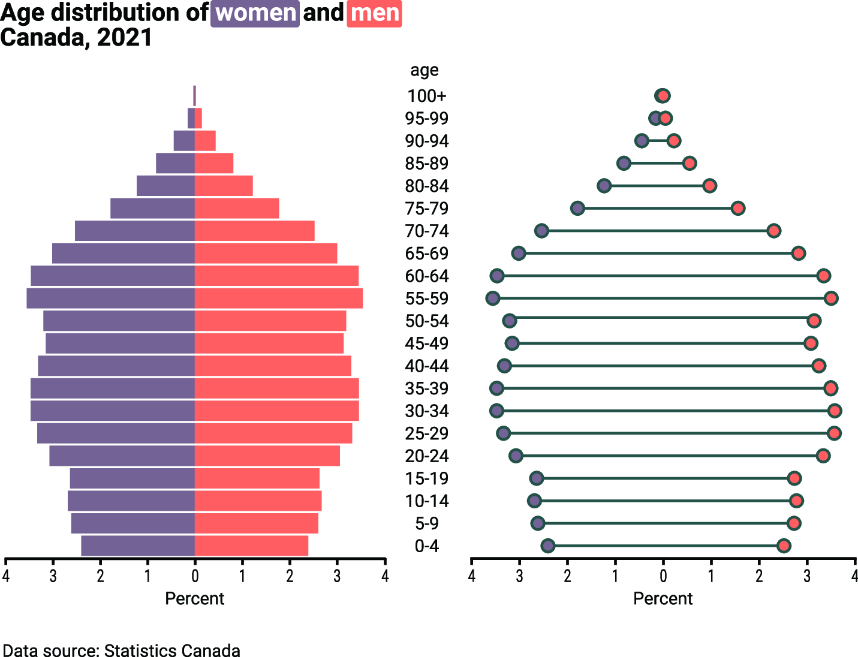
Compare bar-based and lollipop or dumbbell-based pyramid plots for women’s and men’s age distributions. section 6.3

