A random seed is a numeric starting value for pseudorandom generation. In generative image sampling, it controls the initial noise, so the same prompt, settings, and seed can reproduce the same image instead of leaving the result entirely to chance. section 1.2.3
Use the seed to move between surprise and control:
- Leave A1111’s Seed field at -1 to request a new random seed whenever you generate. section 1.2.3
- Recover the previous value with the recycle button, then reuse it while refining a prompt or changing settings. section 1.2.3
- Record the seed shown in generated filenames; A1111 stores it alongside the image number. section 2.1.2
- In img2img, changing the seed produces a different variation of the same base image. section 7.3.1
Fixed or changing seeds in a workflow
For initial development, choose a fixed seed so you can compare prompt and setting changes fairly. In Flux’s RandomNoise node, set noise_seed to a preferred value and control_after_generate to fixed. Choose randomize for fresh results, or increment and decrement to explore nearby seed values while keeping promising results easy to reproduce. section 10.3.1
A tiny reproducibility test
Python demonstrates the idea directly: random.seed(42) produces the sequence 82, 15, 4 when followed by three randint(1, 100) calls. Running the same seeded sequence again produces the same values. section 1.2.3
Figure 10.11 RandomNoize adds a control_after_generation option.
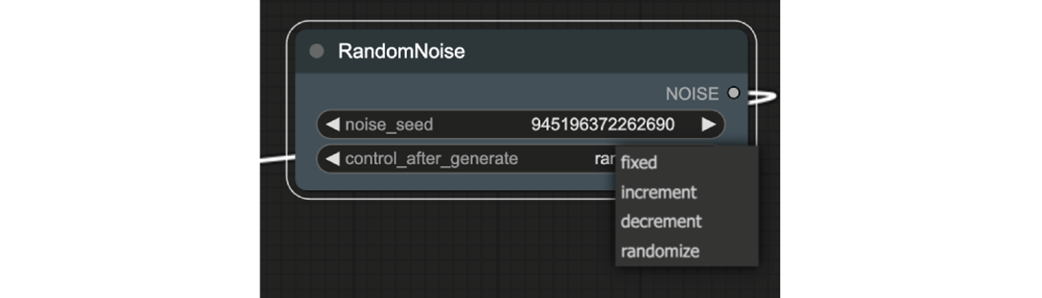
The RandomNoise interface shows how fixed, incrementing, decrementing, and randomized seed behavior is configured. section 10.3.1