A repository is a version-controlled storage area for project code and its revision history. It provides a secure, reliable copy instead of treating a development server as the only backup. section 7.6.1
Avoid the mistake of leaving code only on a development server:
- Create a Git repository for the SQL Server Database project through Visual Studio’s Git Changes window. section 7.6.1
- Configure its local path, optional license, gitignore template, GitHub account, name, description, and owner. section 7.6.1
- Create a code branch, review changes there, and merge approved work into the main or master branch. section 7.6.1
- Use version history to investigate bugs and roll back damaging changes; expect conflicts because files remain unlocked. section 7.6.1
Figure 7.7 Creating and configuring a repo in GitHub
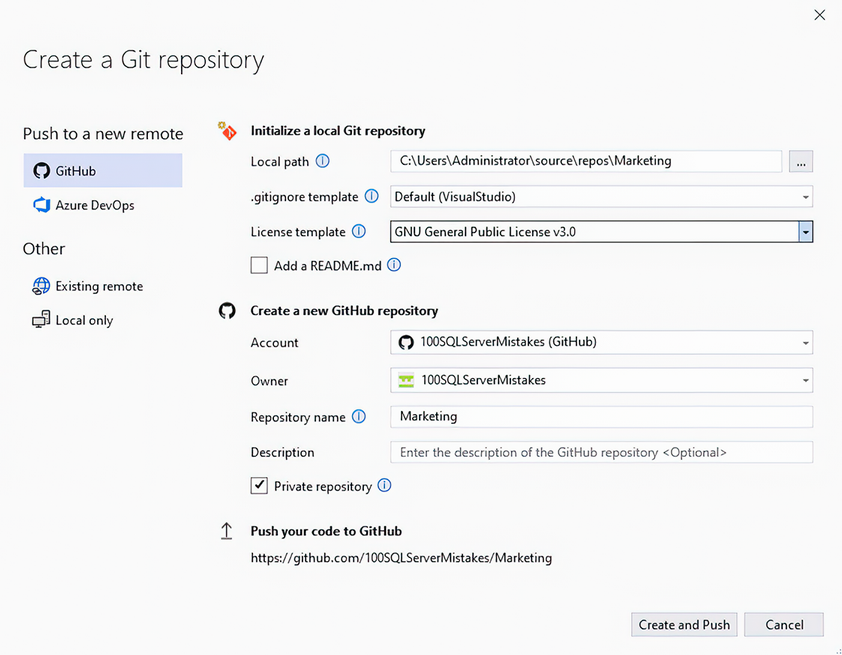
Use the repository configuration view to identify initialization settings, GitHub ownership, and tracking exclusions. section 7.6.1









