A relational database management system (RDBMS) stores and processes relational data organized in one or more tables. Most RDBMSs support SQL, a language for describing data and operations on it. They are suited to efficient filtering and aggregation of tabular data. section 1.4.2 section 2.4.2
Imagine survey results stored in a table. Someone asks, in plain English, how responses differ between groups. A language model can turn that question into SQL; the RDBMS executes the query and returns the result. This keeps large-scale data processing in a tool built for it rather than sending an entire large table to the model. section 1.4.2 section 5.1
Listing 1.3 Prompt template for translating questions to SQL
Database:  #1
The database contains the results of a survey, stored
in a table called "SurveyResults" with the following
columns: ...
Question:  #2
[Question]
Translate the question to SQL!  #3
The prompt template supplies the table description and a question, then asks for SQL. Replacing the question placeholder creates a new request without changing where the data is processed. section 1.4.2
To try the workflow with SQLite in Google Colab:
- Run the notebook cell that creates the example database. section 2.4.2
- Ask for a SQL query, replace the notebook’s sample query with it, and run the execution cell to view the result. section 2.4.2 section 5.1
- Copy the database before executing model-generated queries, and check the query and its result rather than assuming the translation is correct. section 5.5
Figure 2.6 Google Colab notebook allowing you to query the BananaDB database via SQLite. Execute the upper cell (Create Database) to create the database, replace the given SQL query (SQL Query) with a query of your choice, and then execute the lower cell (Execute Query) to see the query result. The arrow marks the Run button to execute the upper cell.
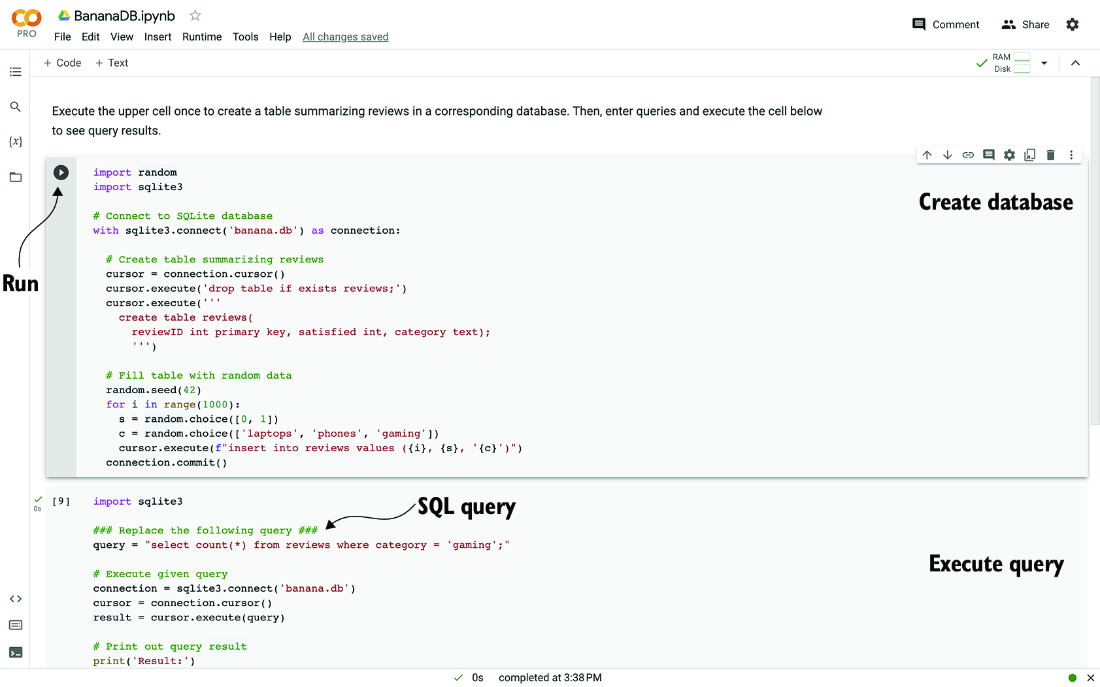
The notebook figure identifies the database-creation, SQL-query, and execution cells, making the separate jobs of preparing data and running a query easy to locate. section 2.4.2





