requests is a Python library for making HTTP calls. Give it a URL and receive a response that can supply API JSON, a downloaded CSV, or a web page. In data pipelines, it is the fetching layer: requests retrieves external data before pandas, HTML parsing, or later normalization work handles it. section 10.5.1 section 4.1.1
Figure 4.1 Interacting with an API: This diagram shows how a client constructs a full request URL by combining a base endpoint with query parameters that define the data request (e.g., filters, limits, and format). The server receives the request, handles tasks like authentication and data lookup, and returns a structured JSON response. This client-server pattern is central to data engineering workflows, where APIs often serve as the primary source of external or cloud-based data. Knowing how to shape requests and interpret responses is essential for working with modern data pipelines.
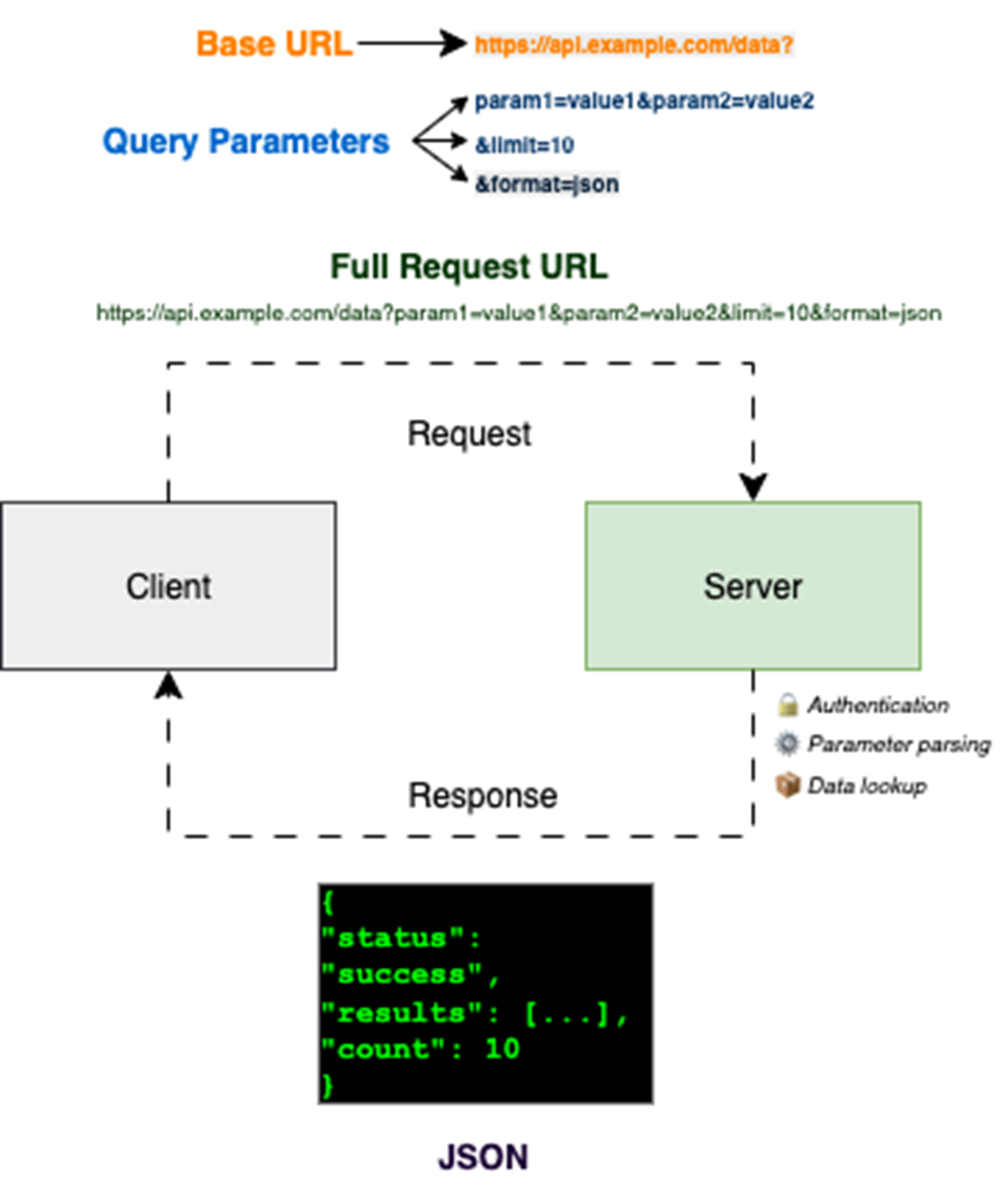
An HTTP request combines an endpoint with query parameters; the server then returns a structured response such as JSON. This client-server exchange is the basic shape behind API ingestion. section 4.1.1
A practical request loop should treat every response as uncertain. Check the HTTP status before consuming data, parse JSON only after a successful response, and record failures alongside the item that caused them. For interactive notebooks, visible progress messages can complement file logging; for longer-running work, timeouts and retry limits prevent a single stalled request from blocking the job. section 4.1.1
Fetch number trivia into a DataFrame
For each number, call the NumbersAPI URL with requests.get(), test for status code 200, read the text field from response.json(), and append a Number/Fact record. On a non-200 response or an exception, append an error record instead and log the outcome. The resulting rows can be loaded into a pandas DataFrame, preserving both successful facts and failures for review. section 4.1.1
For reusable page fetching, separate the network step from parsing and extraction:
- Create one requests.Session and attach browser-like headers, including a realistic User-Agent. section 10.8
- Implement fetch_html(url) with session.get(), a timeout, raise_for_status(), and response.text as the return value. section 10.8
- Pass the returned HTML to BeautifulSoup, then keep title, price, and variant-specific extraction in small helper functions. section 10.8 section 10.5.1
- Handle unreliable or multi-variant pages as extraction problems after fetching rather than assuming one page contains one trustworthy value. section 10.8
requests and BeautifulSoup form a classic scraping harness: requests downloads raw HTML, while BeautifulSoup turns that markup into a navigable tree for tags, attributes, and text. This division keeps retrieval reliable and easy to embed in a pipeline, while schema normalization can remain a separate concern. section 10.5.1