Resource utilization describes how much of a virtual machine’s processor capacity is being consumed during a measurement interval. CPU utilization is a quick health signal: sustained high usage may point to an overloaded application, a poorly optimized workload, or a need to scale. section 3.6.1
Read CPU utilization alongside other signals rather than treating one number as the whole story:
- Compare CPU usage with disk operations, network traffic, and memory pressure to distinguish application load from storage, connectivity, or memory problems. section 3.6.1
- Use Azure Monitor charts and dashboards to inspect current values, then review retained metrics against updates, traffic spikes, or unexpected scripts. section 3.6.1
- Turn a worrying number into an action by alerting when CPU usage exceeds a chosen threshold or departs from its normal pattern. section 3.6.3
A practical alert
Configure a metric alert for CPU usage above 85% for 10 minutes. For a VM that normally idles near 20%, a dynamic-threshold alert could also flag an unusual rise to 60% before the fixed threshold is reached. section 3.6.3
Figure 3.33 Percentage CPU usage shown as a graph for the ActionVM in the Metrics dashboard
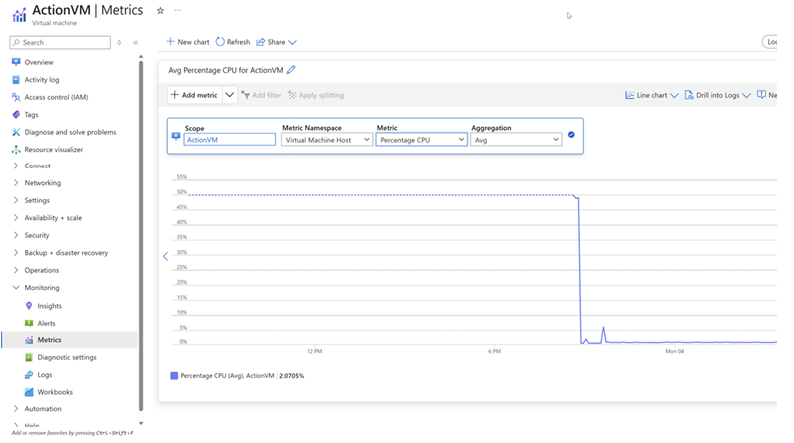
Inspect CPU usage as a percentage graph in the Azure Monitor Metrics dashboard. section 3.6.1







