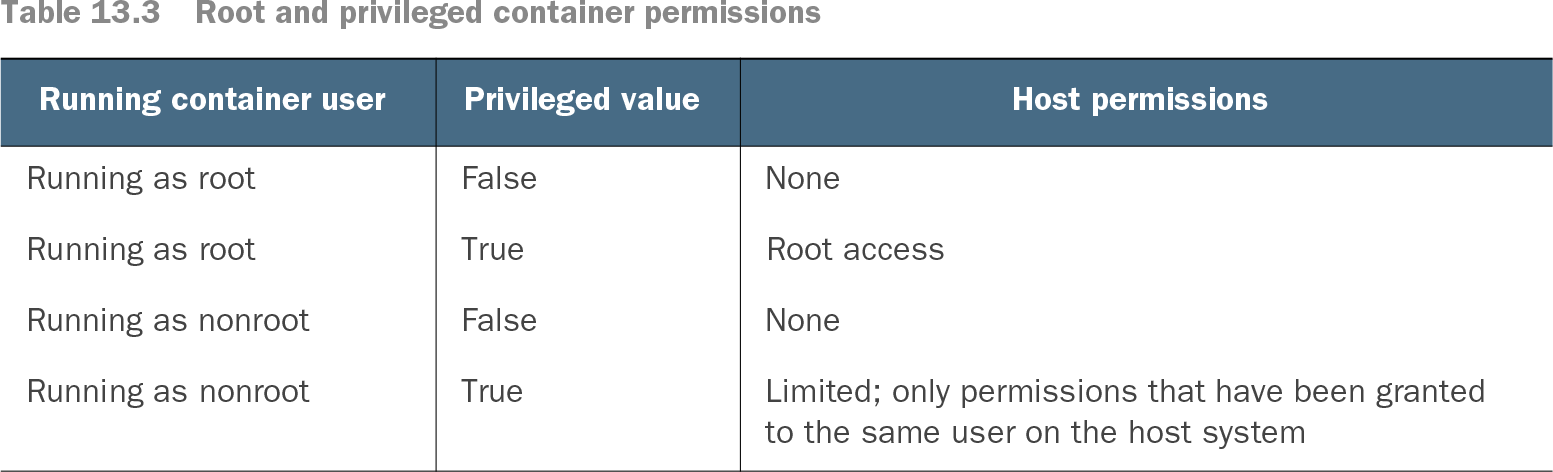
The root user is a superuser account with unrestricted operating-system permissions. In a Kubernetes cluster, the critical distinction is between running as root inside a container and having root access to its host. Many images default to root to avoid permissions problems, but a container running as root does not, by itself, gain host privileges. section 13.3.2 section 13.6
Host access depends on both the container’s running user and whether privileged mode is enabled. A nonprivileged root container cannot change host settings. A privileged root container can gain root access to the host, making this combination a cluster security risk. section 13.6 section 13.6.2
Table 13.3 Root and privileged container permissions (view table figure)
| Limited; only permissions that have been granted to the same user on the host system |
Compare the four user-and-privileged-mode combinations: host root access occurs when the container runs as root and privileged mode is true. section 13.6
Reduce the risk before deploying workloads:
- Run applications with only the permissions they require. Set a Pod securityContext with an explicit runAsUser rather than relying on an image’s default user. section 13.6.1
- Restrict who can deploy privileged containers. A Gatekeeper policy can prevent the dangerous combination of root execution and privileged mode. section 13.4 section 13.6.2
- Inspect and sandbox third-party images before production use; their running user and contents may not be known. section 13.6.1
Testing host permissions
A container running as root without privileged mode is denied when it tries to change a host kernel setting. Enable privileged mode while retaining root, and the change succeeds. Change the container to a nonroot user while retaining privileged mode, and the change is denied again. The test isolates why neither setting should be assessed alone. section 13.6.2