A runbook is an automation definition stored in Azure Automation. It can contain a PowerShell script, PowerShell Workflow, Python script, or a graphical workflow, and can execute in Azure or on a hybrid runbook worker. Hybrid execution delivers the runbook to a selected server, giving centrally maintained automation access to local environments. section 8.2.1 section 8.0
Build a PowerShell runbook as a reusable script first, then import it and replace environment-specific values with Automation assets and parameters. Use a managed identity for Azure access rather than embedding credentials or secrets. A runbook must not depend on console interaction: supply inputs as parameters and avoid commands that can prompt. section 8.4 section 8.4.2 section 8.2.4 section 8.4.4
Adapt ordinary script behavior for unattended execution:
- Write results to the output stream with Write-Output; Write-Host and Write-Progress do not provide useful runbook output. section 8.4.3
- Enable verbose logging only when needed, because it is disabled by default and can slow execution. section 8.4.3
- Test with the required parameter values and the intended hybrid worker, then verify the target resource received the expected result. section 8.4.2
Upload ZIP archives to Blob storage
A runbook can accept a folder path and container as parameters, read subscription and storage settings from Automation variables, authenticate through Connect-AzAccount -Identity, find ZIP files, upload them to Azure Blob storage, and remove the local files after upload. Develop and test that logic locally before importing it, then test it on the server that holds the archive folder. section 8.4 section 8.4.2
Figure 8.2 Automation account hybrid runbook worker automation flow, showing how runbooks can be executed either in the cloud or directly in your on-premises environment
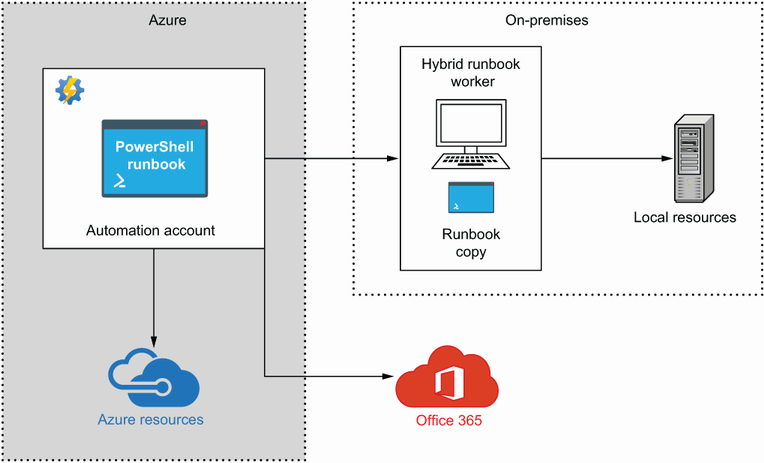
This execution flow distinguishes cloud execution from hybrid-worker execution, where the same centrally stored runbook runs directly on an on-premises server. section 8.2.1


