`runserver` starts Django’s built-in development server, giving a new project a local website to visit before it has any pages of its own. Run it through `manage.py` from the project directory—the directory containing `manage.py`, not the inner configuration directory. section 2.2
Start a local server
Run `python manage.py runserver`. Django performs system checks, reports its settings module and any unapplied migrations, then serves the site at `http://127.0.0.1:8000/`. Stop it with Control-C. On Unix systems, `./manage.py runserver` is a shorter equivalent. section 2.2
A couple of practical details keep the command predictable:
- Use `python manage.py runserver 8800` to listen on port 8800 instead of the default port 8000. section 2.2
- Treat warnings about unapplied migrations as a prompt to run `python manage.py migrate`; the server can start while warning that the project may not work properly. section 2.2
- Find management commands by running `manage.py` with no arguments; Django groups them by app, and `runserver` may appear under `staticfiles` when that app supplies it. section 9.1.1
Figure 2.1 A web server invokes Django through WSGI, Django calls your code, and then it formats the response for a browser
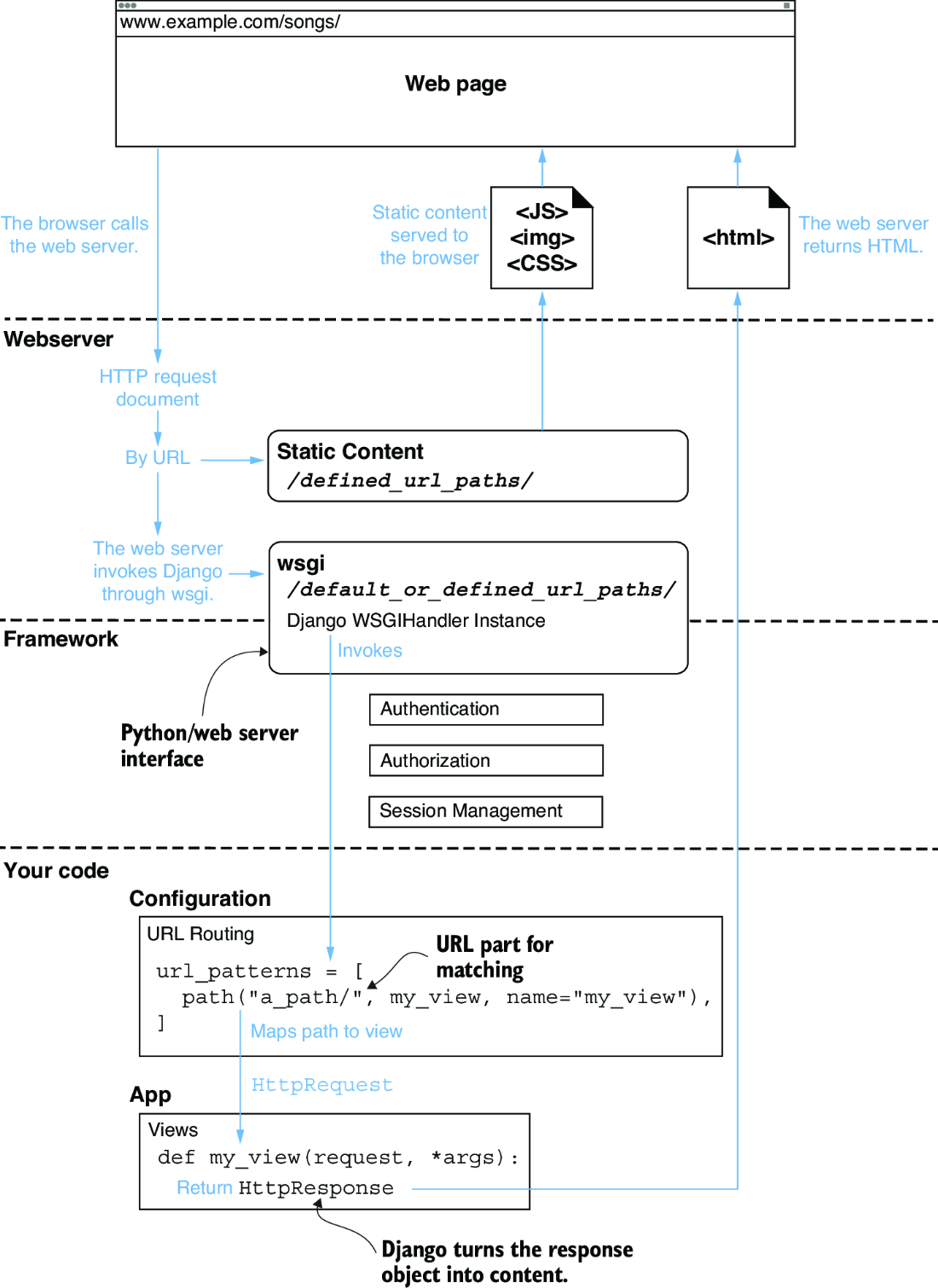
Use this request-flow diagram as the mental model: a web server passes work into Django, Django calls application code, and Django formats a browser response. section 2.2
