The Django development server lets a new Django project answer browser requests while you build it. Start it from the project directory with `python manage.py runserver`, then open the address it prints, commonly `http://127.0.0.1:8000/`. Stop it with CTRL-C. section 2.2
Figure 2.1 A web server invokes Django through WSGI, Django calls your code, and then it formats the response for a browser
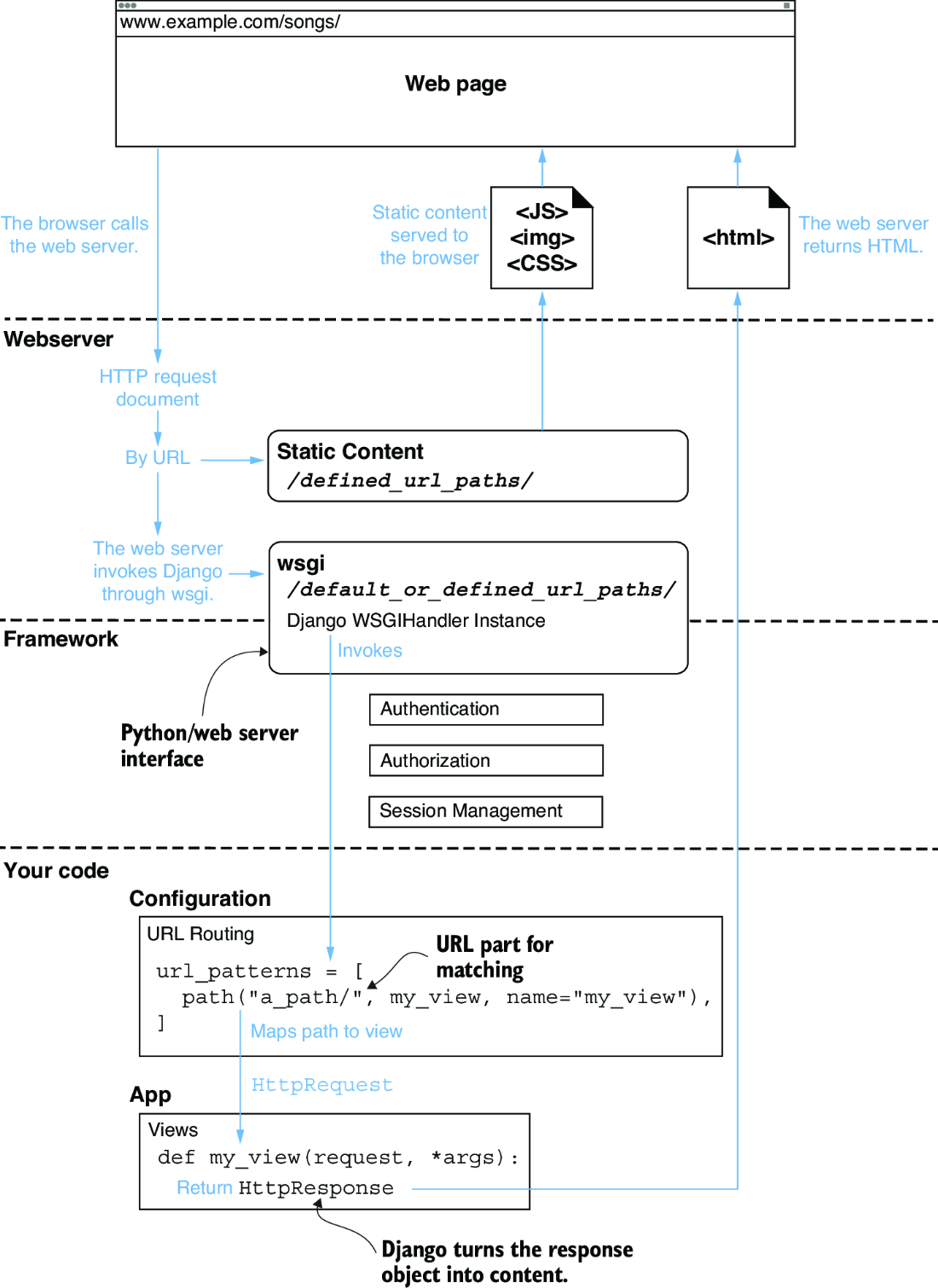
A browser request reaches a web server, which invokes Django; Django calls application code and formats a response for the browser. section 2.2
On startup, the server watches for file changes, performs system checks, identifies the Django settings in use, and reports problems before serving pages. A warning about unapplied migrations means built-in database changes still need to be applied; run `python manage.py migrate`, then restart the server. section 2.2 section 2.7
Viewing a first page
After migrations are applied and the server is running, visit `http://localhost:8000/credits/` to see a wired Django view. Each additional page is another view; later, templates can replace plain-text responses with composed HTML. section 2.7
