A sans serif typeface has letterforms without the small finishing strokes called serifs. It is one of the main type classifications, alongside serif, script, and decorative styles. Classification is a useful starting point rather than a complete description: the choice also communicates a mood and helps a page feel coherent. section 8.1.2
Figure 8.4 Serif vs. sans serif. The serif, with one side much thinner than the other, has greater variation in line strokes than the sans serif.
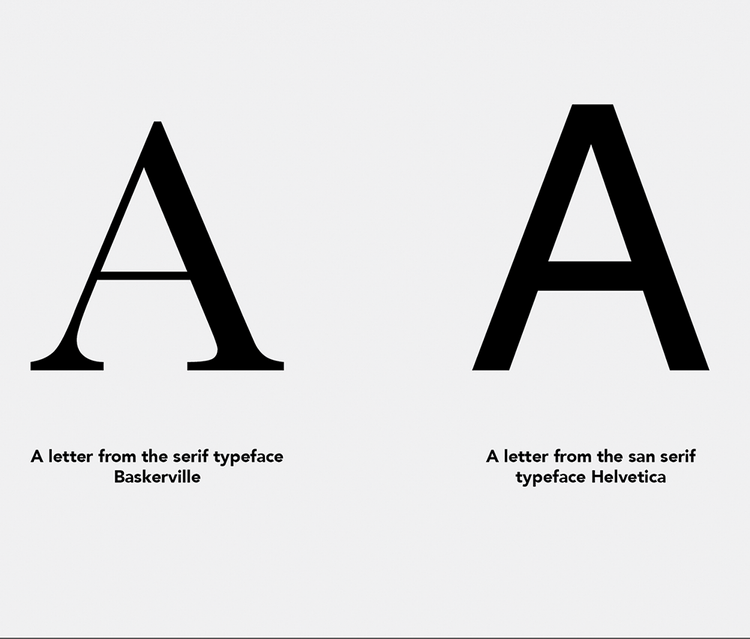
Compare the letterforms: the serif example has finishing strokes and greater variation in stroke thickness, while the sans serif does not. section 8.1.2
Sans serifs often support a modern, current feel. Their details still matter: rounder letterforms can feel playful, while a more rigid sans serif can remain modern without that playful tone. Choose the feeling deliberately, because type can change how people interpret a brand or interface. section 10.4 section 8.3
When choosing a sans serif for a website, make decisions in this order:
- Start with the intended tone. A modern luxury-oriented design may use a rigid sans serif, while rounded forms may better suit a playful direction. section 10.4
- Check readability and legibility at the size where the font will appear. Hard-to-read text can cause users to leave; test on users or lower-resolution devices when uncertain. section 8.2.1
- For body copy, favor differentiated letter shapes and regular or medium weights. Highly geometric, thin, very bold, or specialty faces can be poor choices for small, long passages. section 10.4
- Confirm that web use is licensed. Google Fonts provides open-source fonts optimized for web use; Font Squirrel links to owners or designers so licenses can be checked. section 8.2.1
A sans serif can serve headings, body copy, or both, but hierarchy must remain visible. Within one family, use clearly different weights and sizes; a heading only slightly larger than body text can fail to establish enough contrast. A sans serif may also pair with a serif, decorative face, or script when their shared tone and contrasting forms support the page’s message. section 8.2.2
Building a restrained modern type system
Use Montserrat for headings and titles when a modern, less-playful tone is wanted. Pair it with Albert Sans for body text: its neutral character and differentiated shapes suit readable paragraphs. Keep body text at a regular or medium weight, then build spacing and typography on a 4-point grid so adjustments stay flexible and consistent. section 10.4
Typography is part of usability, not just decoration. Keep long copy in a sans serif or serif instead of a decorative face, give text sufficient contrast for scanning, and support readable body text with appropriate line height and roughly 45 to 70 characters per line. section 8.2.1 section 8.3


