A sans serif typeface has letterforms without serifs: the small finishing strokes or lines found at the ends of open letters. “Sans” literally means “without.” Removing those flourishes does not make every sans serif look alike; it simply describes one structural feature of the letters. section 5.1.3
Figure 5.2 A demonstration of the same typeface, Roboto, in its serif style on the left, with the serifs in red, vs. its (usual) sans serif style on the right

Compare the same Roboto letterforms with serifs marked in red and without them. The difference is small at the stroke level, but it changes the overall texture of text. section 5.1.3
Sans serif is often a practical choice for labels in a visualization. At small sizes, serif details can become muddied by the extra ink, while a sans serif label can remain clearer. This is a guideline for that use case, not a universal verdict on whether serif or sans serif is more readable in every medium or for every text length—the debate is still unsettled. section 5.2.3
Use sans serif deliberately when shaping a hierarchy:
- Keep a single font when a clean, business-like chart is the goal; vary weight or size for a title before adding another typeface. section 5.2.3
- Create restrained contrast by pairing sans serif body text with a serif title, or reversing that relationship. section 5.2.3
- When mixing styles, try related members of one type family. Roboto Serif and Roboto blend because their x-heights and counter shapes are similar. section 5.2.3
Sans serif typefaces also communicate tone before their words are read. A crisp-edged sans serif can suggest a minimalist desk: bare essentials, orderly, and controlled. Yet “sans serif” is not a personality label. Roboto’s heavy, squared, nearly non-tapering strokes can feel solid, no-nonsense, and impersonal, while rounded sans serif forms can feel more open and friendly. Letterform details and their use of surrounding space do the expressive work. section 5.3
Figure 5.22 Here we can see the difference in tone across three different sans serif fonts. The rounded font at the top has a more open and friendly feel than the others, while Recursive Sans Linear has a rather cold and impersonal feel to it, almost slightly alien.
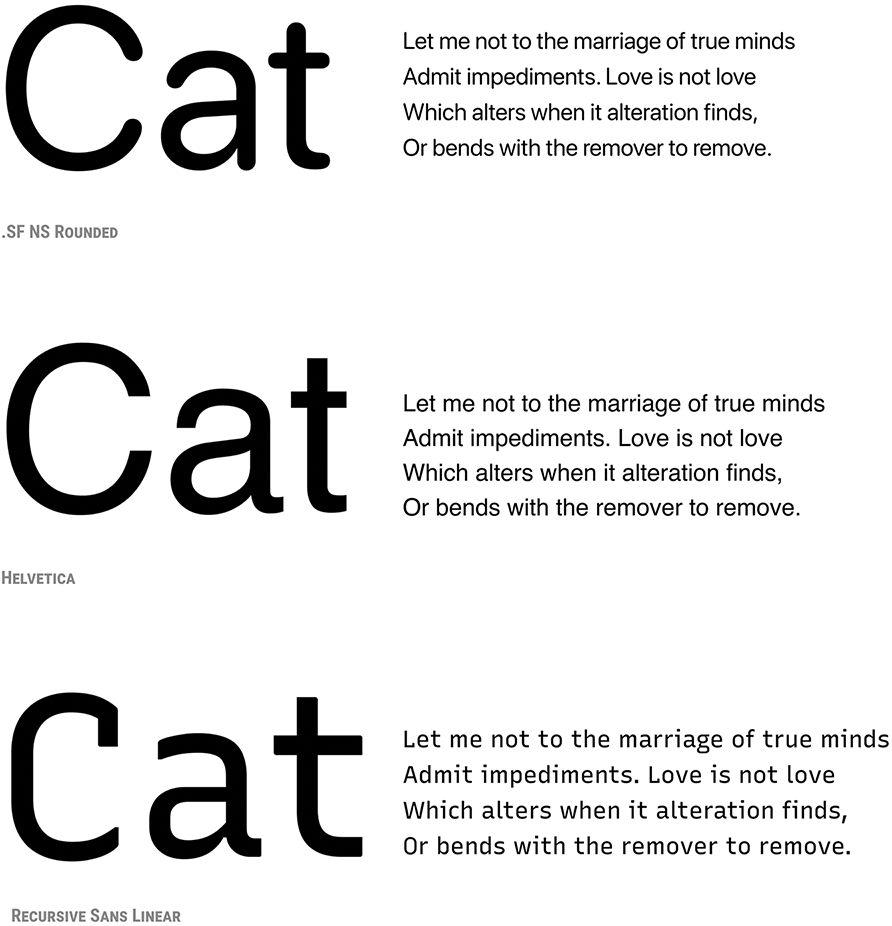
Three sans serif samples make the range visible: rounded forms can feel open and friendly, while Recursive Sans Linear is presented as colder and more impersonal. section 5.3
A small chart label and a contrasting title
For a chart, use a sans serif for labels where compact text needs to stay distinct. If the result feels too uniform, make the title bolder or use a related serif title at a slightly larger size. The contrast should set the title apart without making the typography feel assembled from unrelated parts. section 5.2.3


