liveBook · Manning

Scope

As explained in Microsoft Azure in Action

An authorization scope is the boundary of resources or areas to which an access or authorization assignment applies.

An authorization scope defines where an access assignment applies. In Azure RBAC, it works with a security principal and role definition to form a role assignment. section 6.7.3 section 6.7

Azure lets you target scope at four levels:

A focused resource-group assignment

Suppose Alpaca-Ma-Bags needs to manage resources, but only inside the AlpacaRG resource group. Open that resource group, choose Access Control (IAM), select Add Role Assignment, choose the built-in Contributor role, select the identity, and review the assignment. The scope limits the otherwise broad role to that resource group. section 6.7.3

Figure 6.34 Add a role assignment to the AlpacaRG resource group.
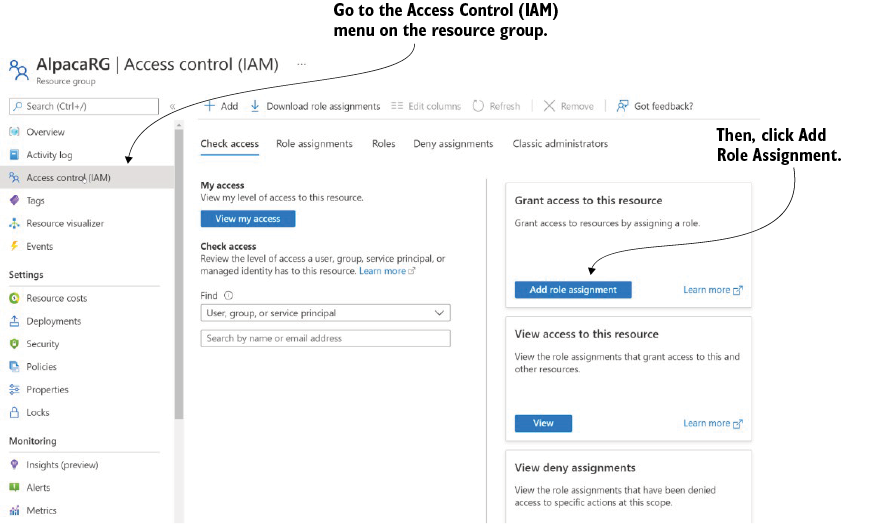
Use the role-assignment view to see how a resource group becomes the boundary for authorization. section 6.7.3


How Microsoft Azure in Action covers it

How deep it goes
Explains four target levels and demonstrates a resource-group assignment, without detailing scope inheritance or custom permission internals.
Examples
Demonstrates assigning the built-in Contributor role to an identity at the AlpacaRG resource-group scope through Access Control (IAM).
What it assumes
Assumes familiarity with Azure identities and resources while defining scope alongside security principals and role definitions.
What you can do after
Operate/configure Azure RBAC assignments that restrict an identity's permissions to a selected management group, subscription, resource group, or resource.
How it connects
Connects scope with RBAC, security principals, role definitions, role assignments, management groups, subscriptions, resource groups, and resources.

Also explained in

Compare how 9 books explain scope →

Related concepts

This explainer was generated by Manning's knowledge graph from the text of Microsoft Azure in Action. The section links point to the parts of the book it draws on.






