liveBook · Manning

Script element

As explained in Secrets of the JavaScript Ninja, Second Edition

An HTML element whose content or referenced resource contains executable script code.

A browser builds a page by parsing HTML and building the DOM, then executing JavaScript. Encountering a script element—containing or referring to JavaScript—triggers execution; the browser can alternate between these steps as needed. section 2.2

Figure 2.3. The page-building phase starts when the browser receives the code of the page. It’s performed in two steps: parsing the HTML and building the DOM, and executing JavaScript code.
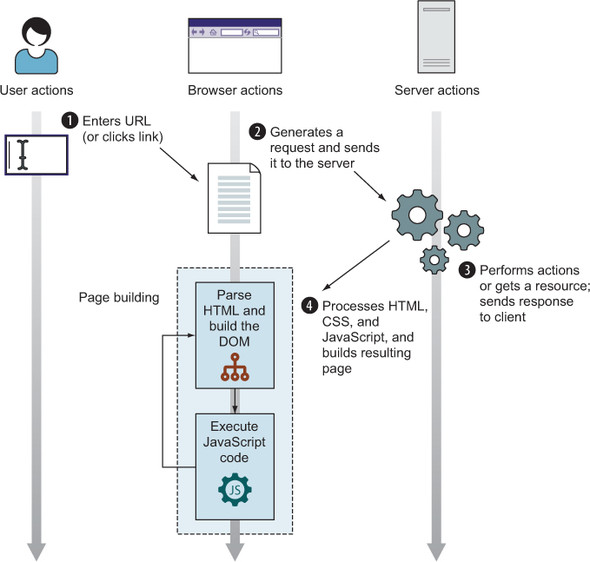
Trace how HTML parsing and DOM construction alternate with JavaScript execution during page building. section 2.2


How Secrets of the JavaScript Ninja, Second Edition covers it

How deep it goes
Describes the element’s role in page construction but gives no syntax or loading details.
Examples
Uses a diagram showing page building alternate between HTML parsing, DOM construction, and JavaScript execution.
What you can do after
Understand how encountering the element fits JavaScript execution into browser page construction.
How it connects
Connects the script element with HTML parsing, the DOM, and JavaScript execution.

Also explained in

Compare how 3 books explain script element →

Related concepts

This explainer was generated by Manning's knowledge graph from the text of Secrets of the JavaScript Ninja, Second Edition. The section links point to the parts of the book it draws on.
