A secret vault keeps sensitive automation values—such as credentials, server names, email addresses, and API keys—outside scripts. PowerShell SecretManagement provides a common command interface over vault backends, so scripts can use one or several registered vaults without changing their retrieval pattern when a backend changes. section 4.3.1 section 4.6
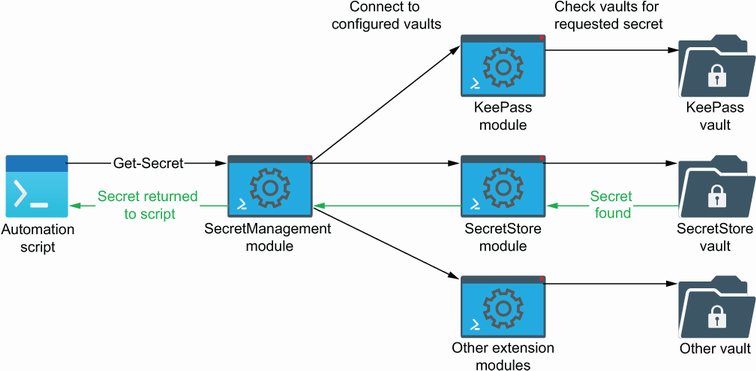
SecretManagement sits between an automation and one or more vault backends, allowing the same command set to reach each registered vault. section 4.3.1
Choose and configure a vault around how the automation runs:
- Use SecretStore for a vault tied to one user and machine. For unattended execution, disabling password prompts avoids hangs, but shifts protection to securing and auditing that account and machine. section 4.3.2
- Use KeePass when a database file must move between machines, users, or a network share. A separate key file can protect a copied database, but the database and key file must never be stored together. section 4.3.3
- Combine vaults when secrets have different sharing and exposure needs. A shared email-credential vault can serve several automations while SQL connection secrets remain isolated. section 4.3.4
Register a vault before using it, then add values with Set-Secret. Assign unique names and give related secrets a common prefix, such as TestSQL and TestSQLCredential; a script can accept the prefix and derive related names. Store only the sensitive value in the secret parameter, and use NoClobber when accidental replacement must be prevented. section 4.3.5
Retrieve secrets for a health check
A SQL health check retrieves a PSCredential and SQL instance name from SecretStore, then retrieves a SendGrid address and API credential from KeePass. Get-Secret can target a named vault explicitly; use AsPlainText only where a retrieved string must be passed as ordinary text. Test the SQL query and email connection separately, checking verbose output for SQL permission failures. section 4.4.1 section 4.3.5
Vault configuration belongs to a user profile, so an unattended task must run as the same user that configured and can access the vault. Specify the Vault parameter during retrieval: otherwise SecretManagement searches vaults beginning with the default vault, which makes unique secret names important. section 4.4.1
