SecretStore is a local PowerShell vault extension for SecretManagement. It stores secrets for one user on one machine, making it practical for automation that needs local credential storage but limiting portability and sharing. section 4.3.1 section 4.3.2
SecretManagement separates automation commands from vault backends, so scripts can use SecretStore alongside other registered vaults or replace a backend without changing their vault-access logic. section 4.3.1
A practical SecretStore setup follows these decisions:
- Install Microsoft.PowerShell.SecretStore and Microsoft.PowerShell.SecretManagement from the PowerShell Gallery. section 4.3.2
- Use Get-SecretStoreConfiguration to initialize the vault and establish its access configuration. section 4.3.2
- For unattended automation, set authentication and interaction to None so a password prompt cannot leave a script waiting indefinitely; a required password instead raises an exception. section 4.3.2
- Register the configured vault with SecretManagement, then secure the hosting account and machine with strong passwords and login auditing. section 4.3.2
SQL health check automation
Store SQL connection secrets in SecretStore while placing reusable SendGrid credentials in a shared KeePass vault. This separates SQL access from email access and lets multiple automations receive email-credential updates through one shared location. section 4.3.4
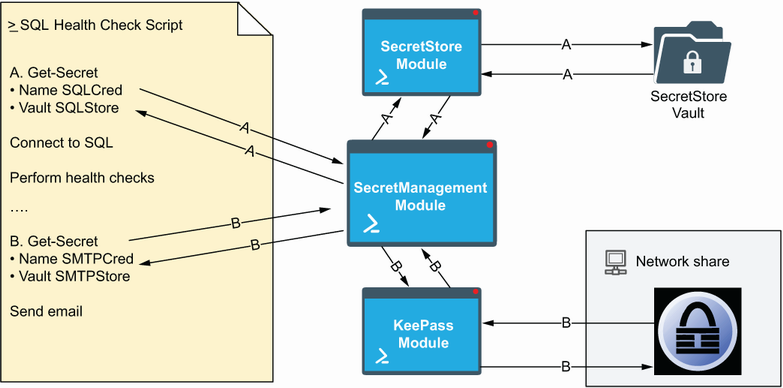
Use the vault-usage diagram to compare SecretStore with a shared vault in the SQL health check design. section 4.3.4
