SecretManagement is a PowerShell vault framework for keeping credentials and other sensitive values out of automation scripts. It presents one command interface over registered vault extensions, so an automation can retrieve secrets from different backends without being rewritten when storage changes. A script may also use several vaults at once, separating secrets by sharing, portability, and security needs. section 4.3 section 4.3.1 section 4.3.4
Install SecretManagement, install an extension for the chosen vault, configure that vault, and register it with Register-SecretVault. SecretStore is a straightforward local option, but its vault is tied to one user and machine. KeePass instead uses a movable database file; a separately protected key file can add protection when unattended automation cannot provide a master password. section 4.3.1 section 4.3.2 section 4.3.3
Choose and configure a vault around how the automation will run:
- Use SecretStore when user-and-machine binding is appropriate. For unattended execution, disabling its password requirement avoids prompts, while making the service account and machine the security boundary. section 4.3.2
- Use KeePass when a shared or portable database is needed. Keep its database and key file protected and never store both in the same place. section 4.3.3 section 4.5
- Combine vaults when their roles differ: place shared email credentials in a shared vault and SQL connection secrets in a separate vault to limit the effect of a compromise. section 4.3.4
Retrieve named secrets for a health check
Use Get-Secret with both Name and Vault to retrieve a SQL credential and server name from SecretStore, then pass them to Invoke-DbaDiagnosticQuery. Retrieve SendGrid values from KeePass for a separate email test. Supplying Vault avoids an ambiguous search across vaults; use AsPlainText only when a standard string is required, such as a server name or email address. section 4.4.1 section 4.4.1
Treat vault configuration as part of the automation environment. Vault settings belong to the user profile, so scheduled work must run as the user that can access the vault. Use unique secret names, test each external connection separately, and inspect verbose output when a SQL test returns no results or reports permission problems. section 4.4.1 section 4.4.1
Security depends on the whole operating design, not only on secret retrieval. Use dedicated accounts with minimum permissions, separate API keys, file and share permissions, and audit controls. SecretManagement v1.0.0 is recommended for Windows here because its SecureString reliance leaves secrets unencrypted in memory on Linux and macOS. section 4.5 section 4.3.1
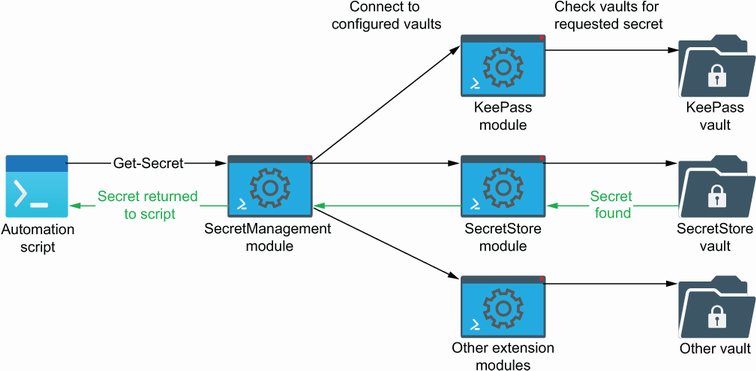
View the framework’s position between one automation and multiple interchangeable vault backends. section 4.3.1
