Secure Score is a 0%–100% security-posture metric in Microsoft Defender for Cloud. It aggregates security findings across an environment: a higher score indicates that more Azure resources follow security best practices and that identified risk is lower. section 6.2.3
Use the score as a single security KPI to track posture over time and support remediation discussions with management. A theoretical 100% means all guidance is implemented continuously, but maintaining that level is difficult in large environments; a consistent score of 85% or higher is the practical target presented here. section 6.2.3
Improve the score through recommendations:
- Onboard Azure subscriptions to Microsoft Defender for Cloud and ensure the MCSB is assigned before requesting resource recommendations. section 6.2.2
- Open Recommendations or Security Posture, then use Potential Score Increase to identify changes that contribute most to the score. section 6.2.2
- Complete every recommendation beneath a security control for every affected resource to receive that control’s maximum score. section 6.2.3
- Address Preview recommendations even though they are excluded from the current calculation, because they will count after preview ends. section 6.2.3
Figure 6.4 The security posture section with secure score in the Microsoft Defender for Cloud dashboard
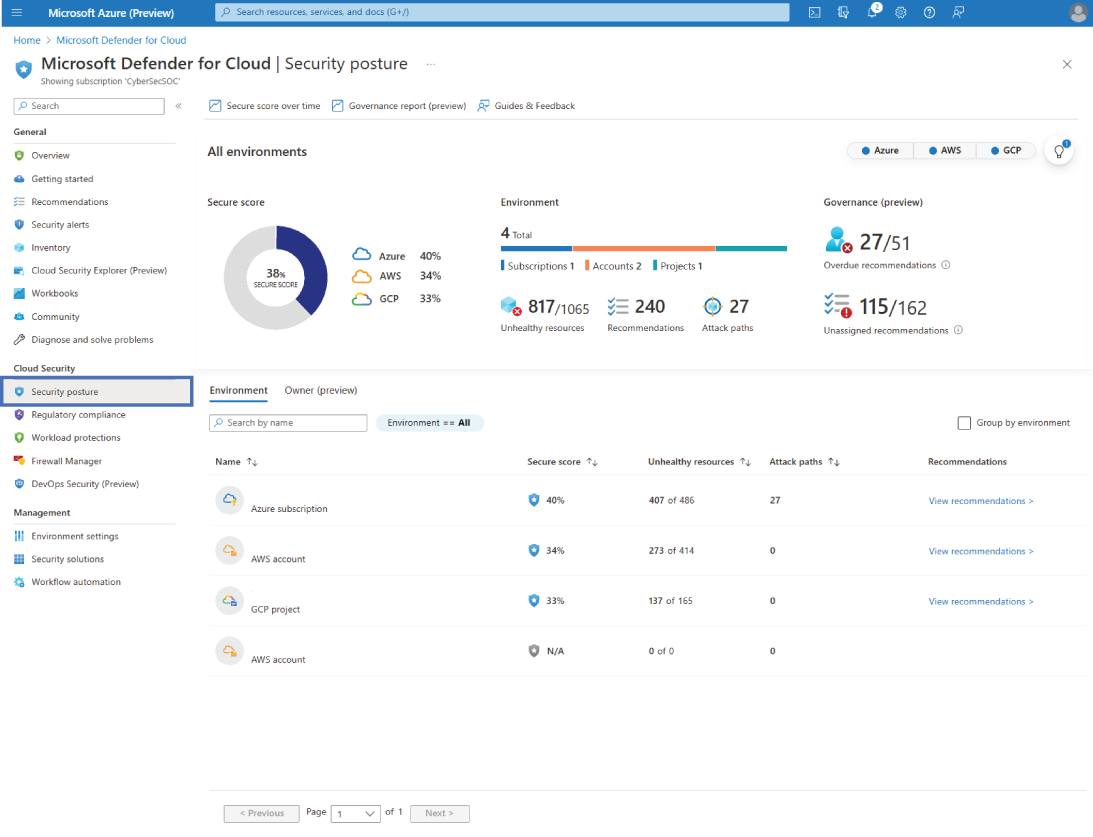
Inspect the Security Posture view to see the percentage-based score in the Defender for Cloud dashboard. section 6.2.3
Secure Score and recommendations are available at no additional cost after onboarding subscriptions. The paid Defender CSPM plan adds advanced posture-management capabilities, including the cloud security graph; enabling it uses the CloudPosture Standard pricing tier. section 6.2.4
Security governance can keep score improvement accountable by assigning remediation owners and due dates. A grace period can temporarily limit an unhealthy resource’s effect on the score until its due date passes, while email notifications summarize task status. section 6.4
Trend reporting outside the dashboard
Export Secure Score data through continuous export when another system needs posture data. Send it to a Log Analytics workspace to retain it in Azure, or to Event Hub for an external destination such as an on-premises SIEM; choose streaming updates, weekly snapshots, or both. section 7.5.1

