A serif is a small finishing line added to the end of a letter’s larger stroke. Typeface classifications use serif as one of four broad groups alongside sans serif, script, and decorative styles. Recognizing the group gives you a useful starting point when choosing type for a web page: the letterform’s details contribute to the feeling people get from the interface. section 8.1.2
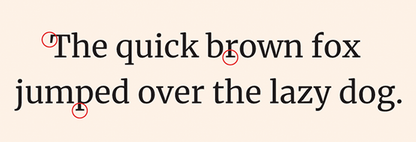
Inspect the ends of the larger strokes: the projecting finishing lines are serifs. section 8.1.2
Serif typefaces have a long history in stone carving and print, and they remain common in newspapers and books. They work especially well for body copy. On the web, though, serif is not automatically more readable than sans serif: digital font choices make both categories capable of being legible. Choose based on the mood the design needs to communicate, then confirm that the selected font reads well at its intended size. section 8.1.2 section 8.2.1
Use serif type deliberately in interface typography:
- Start with the message. Serifs often suggest a professional, strict, classic, or formal tone; contemporary usage can change that impression. section 8.1.2 section 8.2.6
- Keep long body copy in a readable serif or sans serif rather than a decorative face, and ensure sufficient contrast for quick scanning. section 8.2.1
- Test the font at its real size, including on lower-resolution devices or with users, instead of assuming a category guarantees readability. section 8.2.1
- Check licensing and web suitability before embedding a font; a free download is not necessarily cleared or optimized for website use. section 8.2.1
Serifs can also help establish hierarchy through pairing. A slab serif is a serif subclassification; Roboto Slab can serve as a headline face while the related sans serif Roboto serves as body copy. This pairing works because the typefaces share a base design but differ in classification. Increase contrast further with a bolder heading weight. When pairing faces from the same family or category, make size, weight, or letterform differences visibly distinct; otherwise headings and body copy can blend together. section 8.2.2
Choosing a serif for a web page
For a page that needs a classic, formal voice, begin with a serif such as EB Garamond. Use it where its tone supports the content, then test its readability and contrast in the actual layout. If a stronger heading hierarchy is needed, pair a slab serif headline with sans serif body copy, or use clearly different weights. A technology startup seeking a modern tone may instead find a serif choice conflicts with its intended impression. section 8.2.6 section 8.2.2 section 8.1.2
Typeface choice affects more than appearance: it changes how a message feels and how easily people use a page. Treat serif as a visual voice rather than a default rule. Balance its tone with readable sizing, contrast, spacing, appropriate licensing, and a clear hierarchy so the type supports both the brand and the reader’s task. section 8.3 section 8.2.1


