A serif is the small finishing stroke or line at the end of an open letterform. A typeface with these details is a serif typeface; one without them is sans serif—French for “without.” The difference can be tiny at text size, but it changes the character of the letters. section 5.1.3
Figure 5.2 A demonstration of the same typeface, Roboto, in its serif style on the left, with the serifs in red, vs. its (usual) sans serif style on the right

Compare the same Roboto letterforms with their serif details highlighted, then without them. The little endings are doing more visual work than their size suggests. section 5.1.3
Serif is not a synonym for formal, readable, or old; it is a letterform feature. Still, serif fonts are generally perceived as more old-fashioned, and that perception can make them feel especially fitting for historically associated writing. Typography communicates tone independently of the words themselves, so the surrounding shapes, strokes, and use of space matter alongside the presence of serifs. section 5.3
A title with a little contrast
A restrained way to mix styles is to set a sans serif text block with a serif title. Using related styles from one family, such as Roboto Serif with Roboto, can add just enough contrast while preserving harmony through similar x-heights and counter shapes. Making the title slightly larger reinforces its role without turning the page into a font buffet. section 5.2.3
Figure 5.18 Instead of using a bolded sans serif font on the title, we changed it to the serif version of Roboto, Roboto Serif, in regular weight and made it just a smidge larger. Notice how it contrasts with the rest of the text by only a little, just enough to set it apart, but because we stayed within the Roboto family, the two styles blend harmoniously.
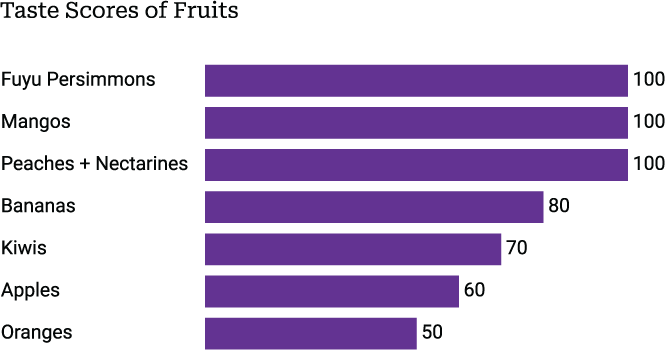
This chart swaps a bold sans serif title for a slightly larger regular-weight Roboto Serif title, showing a small but clear contrast against the body text. section 5.2.3
There is no settled rule that serif is inherently easier to read for long text, small text, print, or digital display. The serif-versus-sans-serif readability debate remains active, with opinions differing over both text length and medium. Treat the choice as a question of the desired tone and the contrast needed in a particular design, rather than a one-size-fits-all verdict. section 5.2.3
Figure 5.21 The subtle differences in each of six fonts can be seen plainly when zoomed way in on a single word. How these differences pan out on a block of text can be seen in the paragraph to the right of each enlarged sample. (From Shakespeare’s Sonnet 116, public domain)
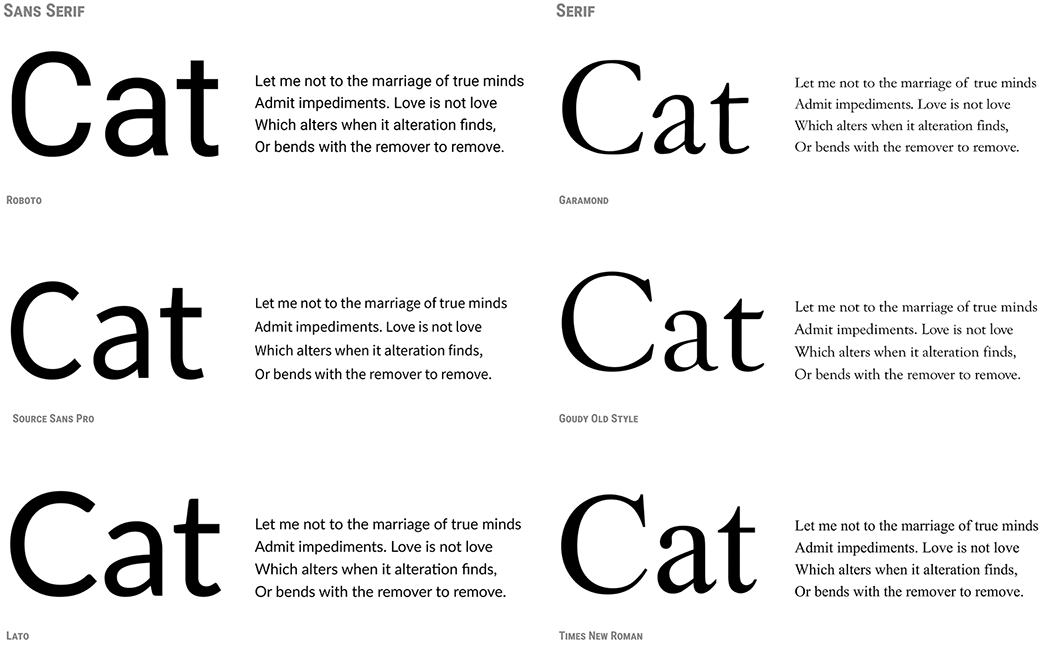
Enlarged samples of Garamond, Goudy Old Style, and Times New Roman make their distinct serif letterforms visible; accompanying text blocks show how those details combine at reading size. section 5.3


