Server-side rendering generates HTML on the server and sends finished pages to the client. In ASP.NET Core, Razor Pages handles URLs, receives form submissions, and produces the HTML users view and navigate. section 13.0
Use it for traditional browser-facing applications when you do not need a separate client-side application. It can also coexist with APIs and other application paradigms when different clients need different interfaces. section 1.2 section 5.1
A typical server-rendered ASP.NET Core page can:
- Handle a request for a URL and return human-focused HTML rather than JSON or XML. section 13.0
- Receive data posted through a form and generate the next page. section 13.0
- Generate dynamic form markup with Tag Helpers, including routes, labels, inputs, selections, validation attributes, and CSRF protection. section 18.6
A browser-facing Razor Pages application
A small Razor Pages application uses a template to create pages that respond to browser URLs, render HTML on the server, and accept submitted forms. If another client later needs data, the same ASP.NET Core application can add an HTTP API rather than replacing the server-rendered pages. section 13.0 section 5.1
Figure 5.1 Modern developers have to consider several consumers of their applications. As well as traditional users with web browsers, these users could be single-page applications, mobile applications, or other apps.
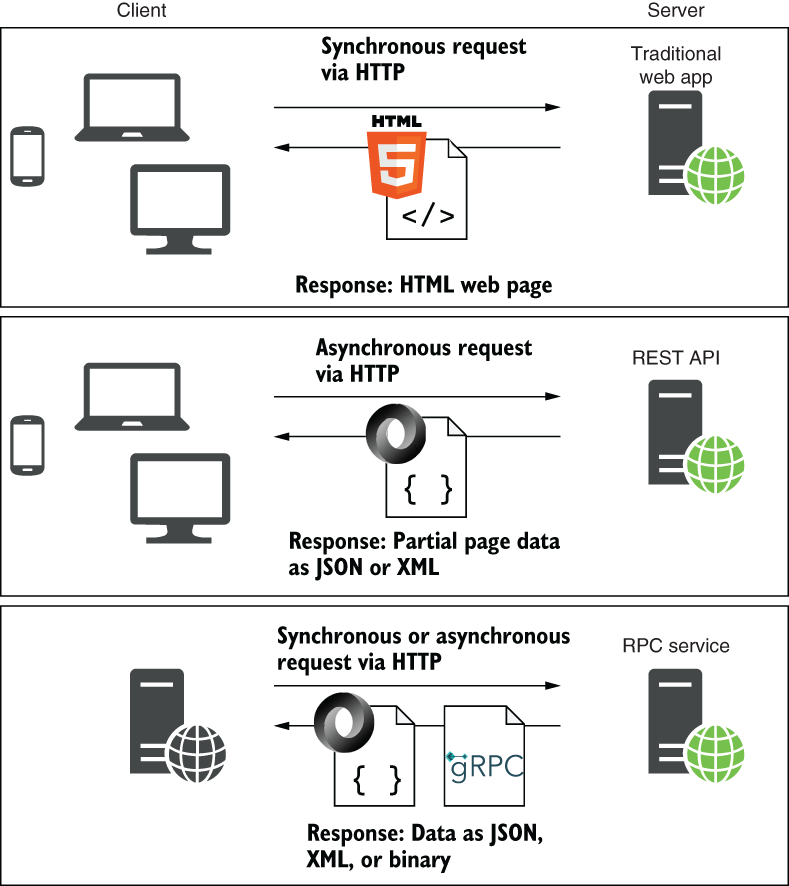
Compare traditional browser users with single-page applications, mobile applications, and other consumers before choosing a rendering approach. section 5.1







