liveBook · Manning

Sidecar process

As explained in Acing the Certified Kubernetes Administrator Exam, Second Edition

The sidecar pattern runs a supporting process alongside a primary application process, typically within the same pod.

A sidecar process runs beside the primary application in the same Kubernetes pod. Containers in that pod share networking and can share storage, enabling fast local assistance without additional services or network policies. section 4.2.2

Use a sidecar when a supporting container must work closely with the application:

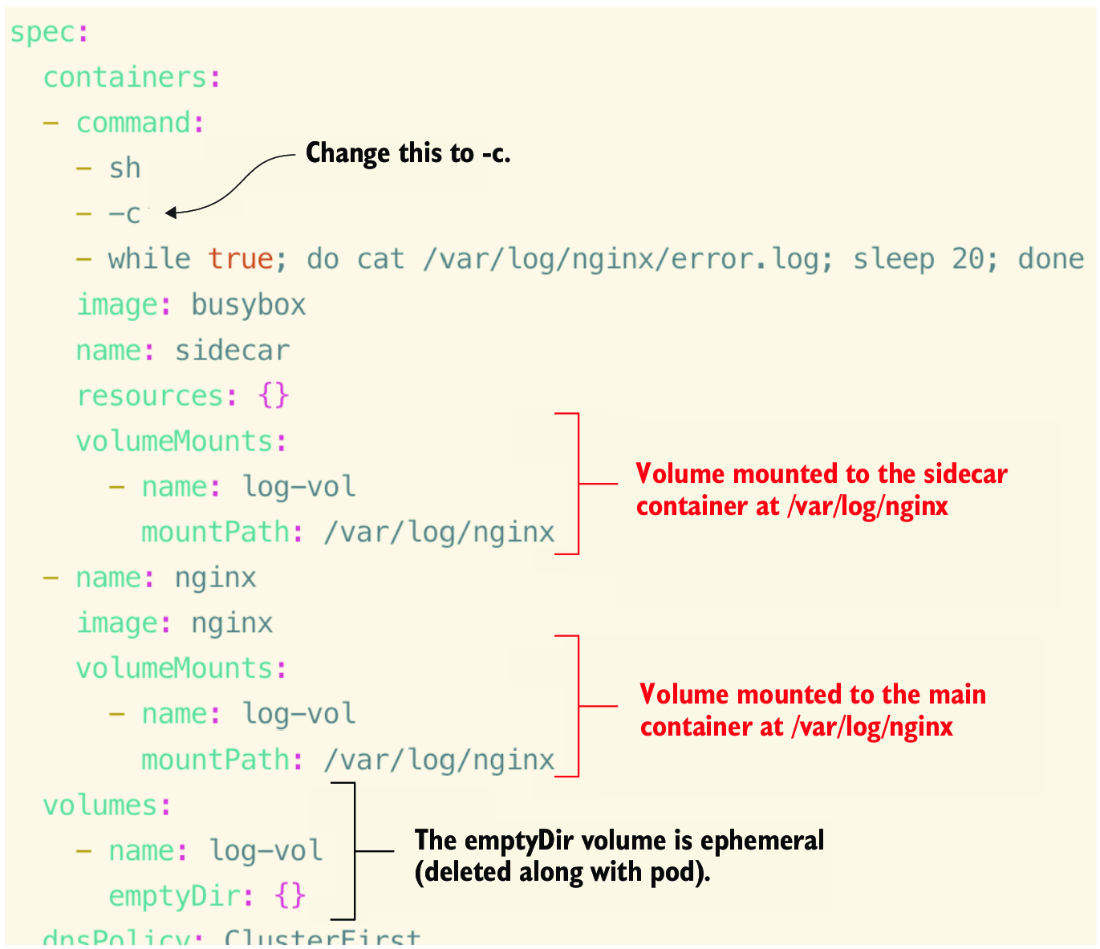
  • Collect or stream application logs: the main container writes to a shared volume, while the sidecar reads or forwards the data. section 4.2.2
  • Define both containers in one Pod manifest and mount the same volume where data must pass between them. section 4.2.2
  • Distinguish a continuously running sidecar from an initContainer, which completes setup before the main container starts. section 4.2.2

Inspecting a two-container pod

Create or apply a Pod containing a primary busybox container and a sidecar container, then verify it with `kubectl get po`. A healthy pod reports `2/2 Running`. Inspect one container with `kubectl logs busybox -c sidecar`, or stream both with `kubectl logs busybox --all-containers -f`. section 8.1.1

Figure 4.14 Adding an additional container to a pod, which will serve to read logs from the main application
figure

Use the figure to visualize adding a log-reading container alongside the primary application in one pod. section 4.2.2


How Acing the Certified Kubernetes Administrator Exam, Second Edition covers it

How deep it goes
Explains shared namespaces, shared volumes, manifest changes, and kubectl verification, but does not detail broader sidecar architectures.
Examples
Uses a busybox log sidecar, an emptyDir volume, Pod YAML, and kubectl logs output showing individual or combined container logs.
What it assumes
Assumes basic Pod, container, volume, YAML, and kubectl knowledge while demonstrating multicontainer configuration from a practical example.
What you can do after
Apply it via kubectl by creating a two-container Pod, sharing storage, and inspecting each container's logs.
How it connects
Connects sidecar processes with multicontainer pods, shared volumes, log collection, init containers, and Kubernetes Services.

Also explained in

Compare how 11 books explain sidecar process →

Related concepts

This explainer was generated by Manning's knowledge graph from the text of Acing the Certified Kubernetes Administrator Exam, Second Edition. The section links point to the parts of the book it draws on.








