A sidecar container is an additional container co-located with a primary container in a Podman pod. It supports or monitors the application or its execution environment, while the primary container runs the application. section 4.1
The pod supplies shared execution context: containers join the infra container's Linux namespaces and cgroups, inherit pod volume mounts, and share its network namespace. A sidecar can therefore update files consumed by the primary container. section 4.2 section 4.3
Updating web content
Create a pod with a shared ./html:/var/www/html:z volume, add myapp as the primary container, and add a ubi8 container named time with --workdir /var/www/html. Run ./time.sh in the sidecar to rewrite index.html every second; myapp serves the changing timestamp on port 8080. section 4.2 section 4.3 section 4.4
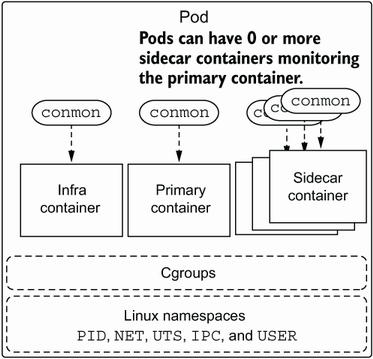
Use the process diagram to distinguish the primary application from additional sidecar containers launched into the pod. section 4.1
Use sidecars sparingly: multiple sidecars can consume additional resources and make a pod unwieldy. Starting or stopping the pod manages its infra, primary, and sidecar containers together. section 4.1 section 4.4










