Small multiples arrange related visualizations in a series, using shared scales and axes to show different aspects or subsets of data. A grid of compact charts can replace one oversized visualization and adapt more easily across desktop, tablet, and mobile layouts. section 14.3
A responsive small-multiples implementation can follow this pattern:
- Assign one visualization to each data subset, such as one circular chart for every year. section 14.3
- Change the grid from three columns to two and then one as the available width decreases. section 14.3 section 14.4.1
- Compute rows, item dimensions, and SVG height reactively from the number of columns. section 14.4.1
- Render each item through a child component that receives its dimensions and data subset as properties. section 14.5.1
For radial charts, establish a local coordinate system inside each grid item. Calculate the circle radius from item width and padding, then map months around the circle with a point scale and trigonometric coordinates. section 14.5.1
Van Gogh yearly grid
A visualization of Van Gogh’s work can use one circular small multiple per year. Months occupy positions around each circle; drawing counts appear as area charts, letter counts as bar lengths, and paintings as clustered circles. A timeline sits beside the grid on larger screens and disappears on small screens. section 14.3 section 14.5
Figure 14.5 Small multiples visualizations are composed of a series of charts sharing the same scale and axes. They are usually laid out into a grid, making them easy to adapt to different screen sizes.
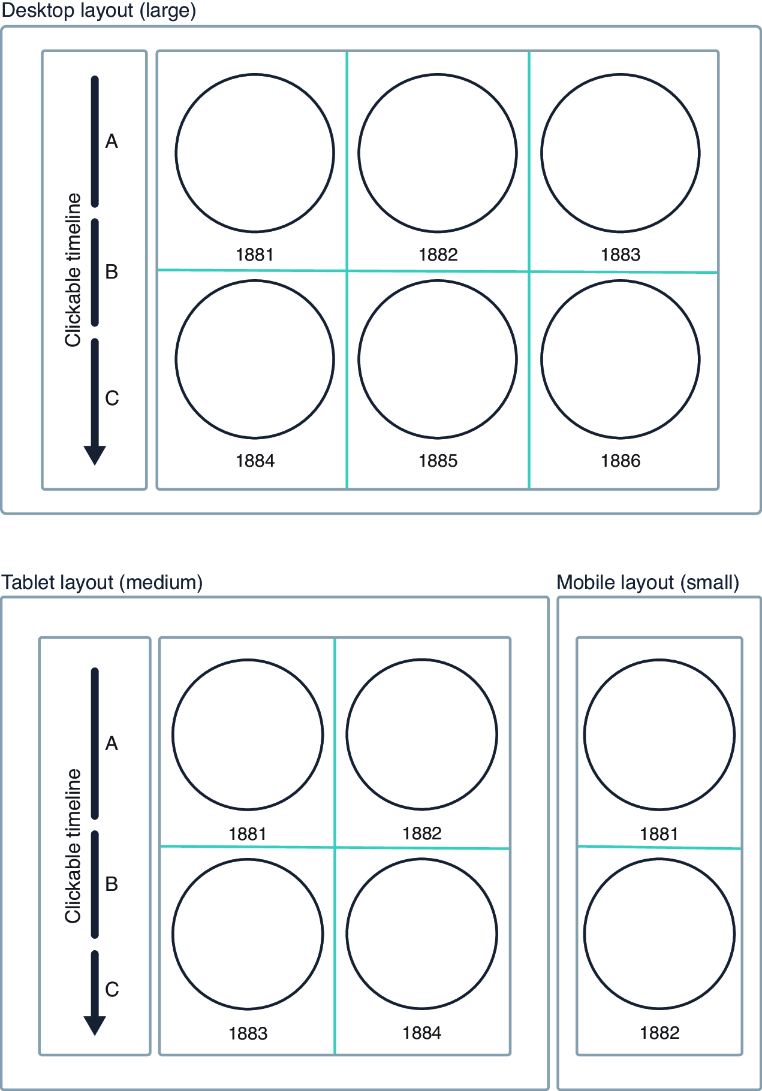
Use the figure to inspect how shared axes and scales turn separate charts into a readable, responsive grid. section 14.3

