A database snapshot is a read-only, point-in-time view of a SQL Server database. It uses copy-on-write technology and preserves pages as they existed when the snapshot was created. section 12.2
Use snapshots to:
- Generate reports against data from a particular point in time. section 12.2
- Compare current data with an earlier state. section 12.2
- Recover data deleted through human error or roll back a failed deployment while the source database remains healthy. section 12.2
A new snapshot starts as an empty sparse file. When a source page changes, SQL Server copies the original page into the snapshot before applying the update. Queries read preserved pages from the snapshot and unchanged pages from the source database. section 12.2
Mistake: treating a snapshot as a backup
A snapshot depends on the source database. If that database is corrupted or deleted, the snapshot is unavailable; if the instance or server fails, the snapshot cannot be moved to another instance for recovery. Keep backups as the recovery strategy, and use snapshots as a complement. section 12.2 section 12.12
Figure 12.2 Snapshot process
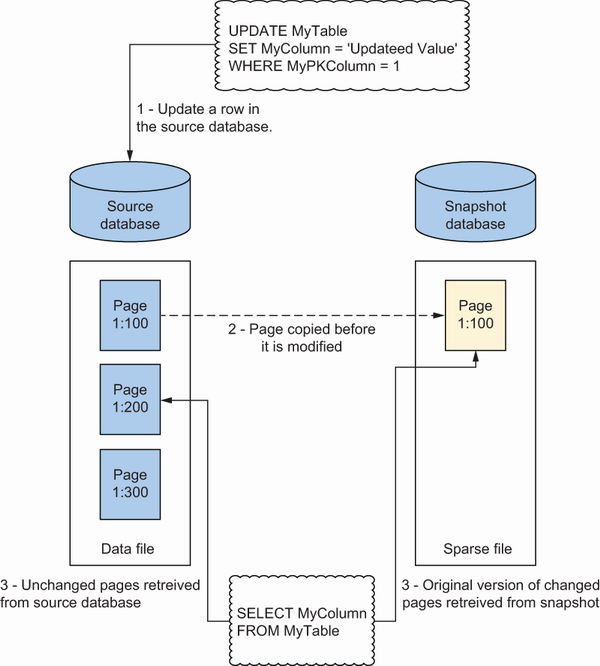
Use the snapshot-process figure to trace how source-page changes populate the snapshot while unchanged pages remain read from the source. section 12.2










