A snapshot backs up Elasticsearch indexes, data streams, and cluster state to durable storage so selected data or an entire cluster can be restored later. Snapshots belong in an off-cluster repository, such as a filesystem, HDFS, or cloud storage, and are suited to regularly automated backups. section 14.4 section 14.4.1
Use the snapshot lifecycle in three stages:
- Register a repository before storing snapshots. section 14.4.1
- Create a full or selective snapshot through the REST API or Kibana. After the first backup, later snapshots store incremental updates rather than full copies. section 14.4.1 section 14.4.3
- Restore an index, a set of indexes, or the full cluster from the registered repository when recovery or migration is required. section 14.4.1 section 14.4.5
Back up production search data
Create a complete snapshot with `PUT _snapshot/es_cluster_snapshot_repository/prod_snapshot_oct22`. To limit the backup, send an `indices` array such as `["*movies*", "*reviews*", "-*.old"]`; attach a `metadata` object when the snapshot needs incident or request details. Delete an obsolete snapshot with `DELETE _snapshot/es_cluster_snapshot_repository/custom_prod_snapshots` to reclaim repository space. section 14.4.3 section 14.4.5
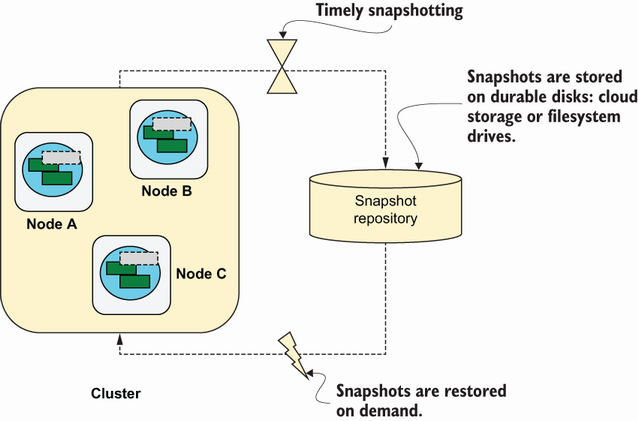
Follow the cluster-level flow from durable repository storage through snapshot creation and on-demand restoration. section 14.4










