Design spacing arranges empty space between and around interface elements. Consistent measurements establish visual patterns, while deliberate changes in whitespace can create emphasis and hierarchy. section 11.1.1 section 11.1
Apply spacing by combining several practical concerns:
- Start with margins when matching precise distances between elements, then adjust for relative units and line-height. section 12.1
- Treat typography as part of spacing: line-height controls vertical distance between lines, while letter-spacing controls horizontal distance between characters. section 12.6
- Use flexbox gap and alignment properties when spacing items inside a flex container, adding them after the main layout is established. section 4.4
- Reuse consistent spacing patterns, then break them intentionally when an important element needs stronger contrast. section 11.1
Turning a measured mockup into a page
A design mockup may specify 10 px between navigation buttons, 40 px below a hero image, and 30 px between a column heading and its paragraph. Repeated values such as 10 px and 25 px create a coherent visual rhythm; implementation then preserves those relationships as the page gains content. section 11.1.1
Spacing text for comfortable reading
Compare compressed, comfortable, and overly spread text. Very tight spacing increases concentration and makes the page feel cramped; excessive spacing draws attention to individual letters. Adjusting line-height and letter-spacing can improve readability and engagement. section 12.6
Figure 11.4 A mockup of the page design with annotated measurements
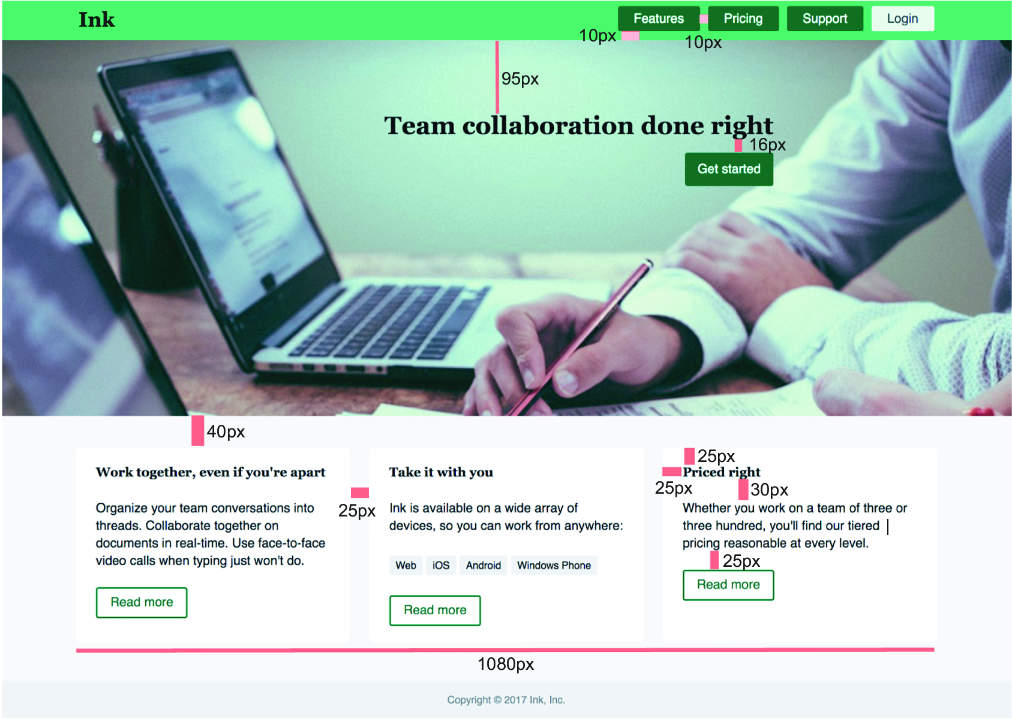
Use the annotated mockup to inspect how exact measurements connect individual elements into a repeated page-wide spacing pattern. section 11.1.1

