Sparse data contains relatively few observations compared with the possible values being considered. In a visualization, those absences are part of the story—not clutter to quietly sweep under the rug. section 9.1.1
Make sparse data readable and honest:
- Show missing points explicitly. Add dots to line charts so viewers can see both the observations and the gaps. section 9.1.1
- Break a line where data is missing instead of implying an uninterrupted trend. section 9.1.1
- Leave empty positions for missing days, weeks, or months in trended bar charts. section 9.1.1
- When data is very sparse, design for its eventual growth: check the visualization periodically and test it with realistic data. section 9.1.1 section 9.5
A daily trend with missing days
A plain line can make a sparse daily series look continuous. Add a dot at every recorded day, break the line across missing days, and leave empty positions for missing days in a bar-chart version. section 9.1.1
Figure 9.1 When trending data in a line chart, I like to make it more obvious where the data points are by adding a dot at each point. Not only is it easier to understand, but it’s also more apparent when there’s data missing. Breaking the line on missing data points further drives the point home.
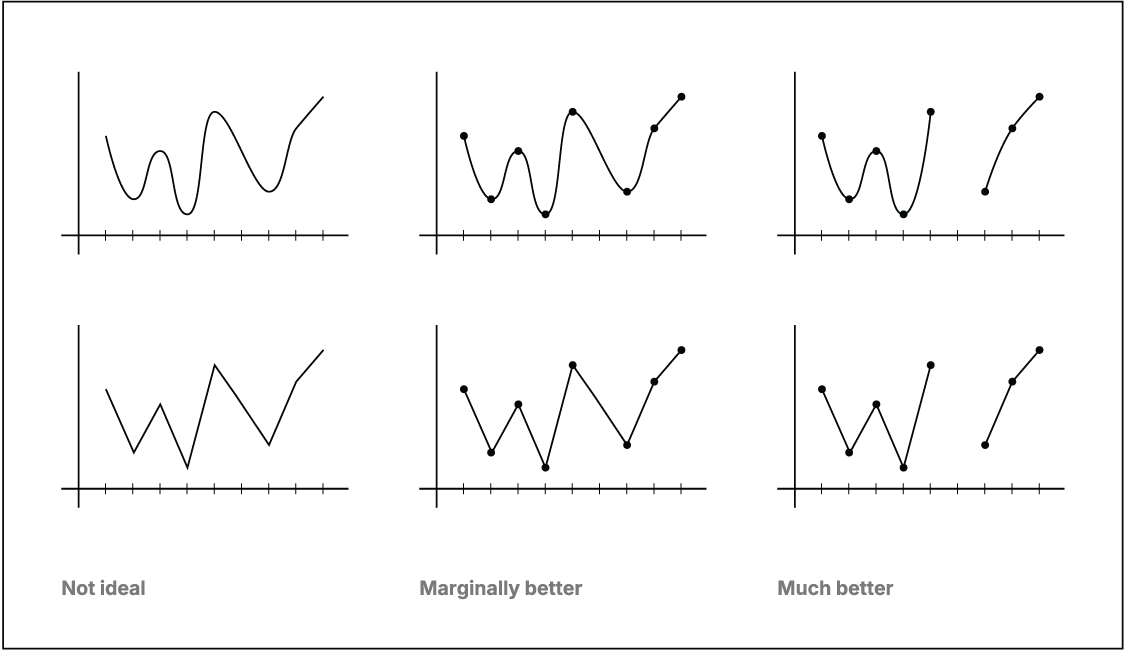
Compare a connected line with point markers and breaks to see how the design makes missing observations visible. section 9.1.1
The goal is not to make an imperfect dataset look complete. It is to prevent viewers from drawing conclusions that the available evidence cannot support. section 9.1.1 section 9.5



