Split-MAC architecture divides wireless LAN control between lightweight access points (LWAPs) and a wireless LAN controller (WLC). LWAPs handle time-sensitive radio and frame operations, while the WLC centralizes intelligence and management for larger networks. section 19.2.2 section 19.3
Assign responsibilities as follows:
- LWAPs transmit and receive RF signals, encrypt 802.11 frames, send beacons, and respond to client probe requests. section 19.2.2
- The WLC performs RF management, client authentication and association, and QoS and security policy enforcement. section 19.2.2
- LWAPs normally use access ports in the management VLAN, while the WLC uses a trunk to carry multiple WLAN-to-VLAN mappings. section 19.2.2 section 21.1.1
- CAPWAP establishes separate control and data tunnels; the control tunnel uses UDP 5246 and the data tunnel uses UDP 5247. section 19.3
- CAPWAP control traffic is encrypted by default with DTLS, whereas the data tunnel is not encrypted by default. section 19.3
Typical switch arrangement
Connect the LWAP to an access port in the management VLAN. Configure the WLC connection as a static LAG in trunk mode and allow the management, internal, and guest VLANs: `channel-group 1 mode on`, `switchport mode trunk`, and `switchport trunk allowed vlan 10,100,200`. Cisco WLCs support static LAGs but not PAgP or LACP. section 21.1.1
Figure 19.6 Two LWAPs managed by a WLC. The WLC handles management functions, and the LWAPs handle real-time functions.
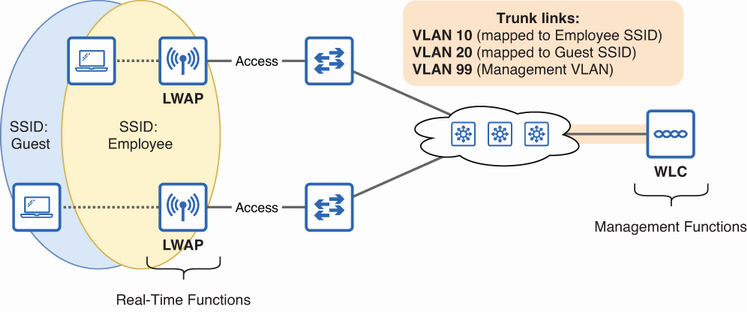
Use the architecture diagram to distinguish centralized WLC management from LWAP real-time wireless handling. section 19.2.2
Figure 19.7 LWAPs tunnel client data frames to the WLC, which translates them into Ethernet frames.
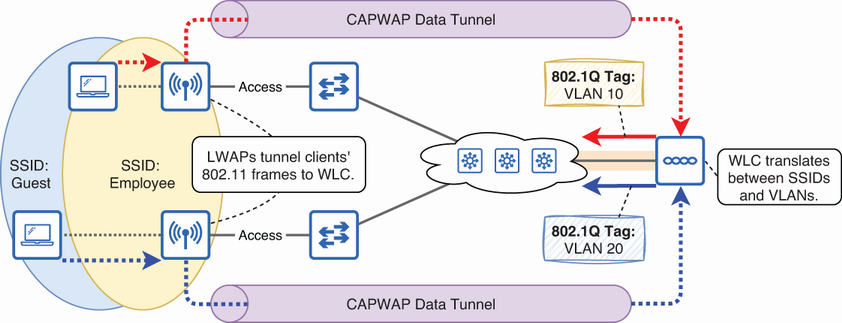
Use the frame-flow diagram to trace client traffic through the LWAP tunnel to the WLC and onward as Ethernet traffic. section 19.2.2
Figure 19.8 CAPWAP creates two tunnels between each LWAP and the WLC: a control tunnel and a data tunnel. The control tunnel uses UDP port 5246, and the data tunnel uses UDP port 5247.
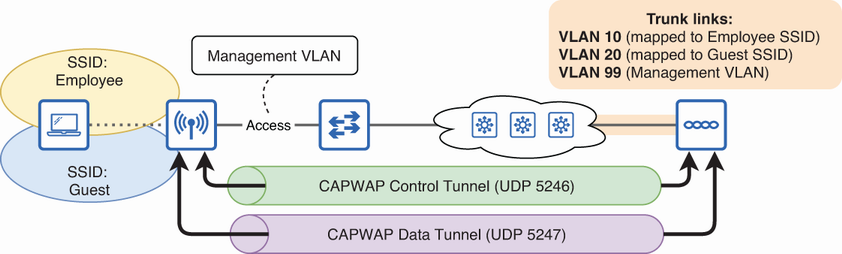
Use the CAPWAP tunnel diagram to identify the separate control and data paths and their UDP ports. section 19.2.2
