A stack generator is a D3 layout function that prepares multiseries data for stacked charts. Rather than drawing SVG itself, it transforms category values into an annotated dataset whose points hold lower and upper boundaries. Those boundaries determine where each series begins and ends in a stacked bar chart or streamgraph. section 5.0 section 5.2.1
Create one with d3.stack(), choose the value fields with keys(), and call the configured generator with the original data. The result is a multidimensional array: one array per series, identified by its key, containing one point per input record. Each point exposes its lower boundary as d[0], upper boundary as d[1], and the original record through d.data. section 5.2.1 section 5.4
Stack music-format sales
For yearly sales records with one field per music format, map format IDs into keys(), then pass the records to the generator. Each format becomes a stacked series. Bind the resulting series to SVG rectangles for stacked bars, or pass their d[0] and d[1] values to d3.area() for stacked areas. section 5.2.1 section 5.2.3 section 5.4
Configure the stack to control both appearance and scale requirements:
- Use order() to choose vertical series ordering. The default follows the keys array; built-in alternatives reverse it, sort by total, arrange by peak appearance, or place earlier peaks toward the center. section 5.2.4
- Use offset() to control the zero baseline and vertical distribution. Some offsets place all series above zero, while others distribute them above and below it. section 5.2.4
- Recalculate the y-scale domain from the annotated lower and upper boundaries when an order or offset can introduce negative values or change extrema. section 5.2.4
Figure 5.14 The stack layout generator transforms data points into stacked data columns and returns an annotated dataset containing each data column’s lower and upper boundaries. Here we see an example for the year 1986.
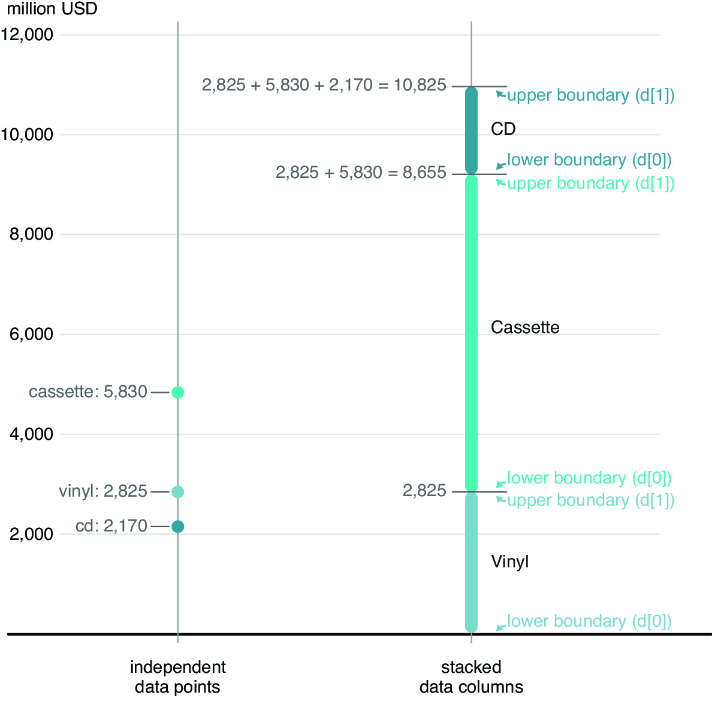
Inspect the transformation from input values to stacked columns and the lower and upper boundary pair returned for each point. section 5.2.1
