Streamlit is a Python framework for building interactive web applications for data and machine-learning workflows. It uses a code-first model: declare Python components, connect familiar libraries, and let Streamlit render the interface without requiring JavaScript frontend code. section 9.1.1 section 9.3
A practical Streamlit data app can combine:
- A Python script such as app.py as the application canvas for titles, text, widgets, charts, and tables. section 9.1.2
- DuckDB through its Python package, including read-only access to an embedded database in the same process. section 9.1.2
- Reusable components such as search boxes, columns, and dataframes instead of hand-written HTML and JavaScript. section 9.1.3
- Python libraries including pandas, scikit-learn, matplotlib, and DuckDB for data processing and visualization. section 9.1.1
ATP head-to-head application
A compact application searches player names in an ATP matches table, lets users choose two players, queries their matches, counts wins, and displays the results. Start with `import streamlit as st`, configure a wide layout, and run the script with `streamlit run app.py`. Add `st.columns(2)` and `st_searchbox(search_players, ...)` for two player selectors, then pass the selections into a parameterized DuckDB query and render the returned DataFrame with `st.dataframe(...)`. section 9.1.2 section 9.1.3
Figure 9.1 ATP database schema
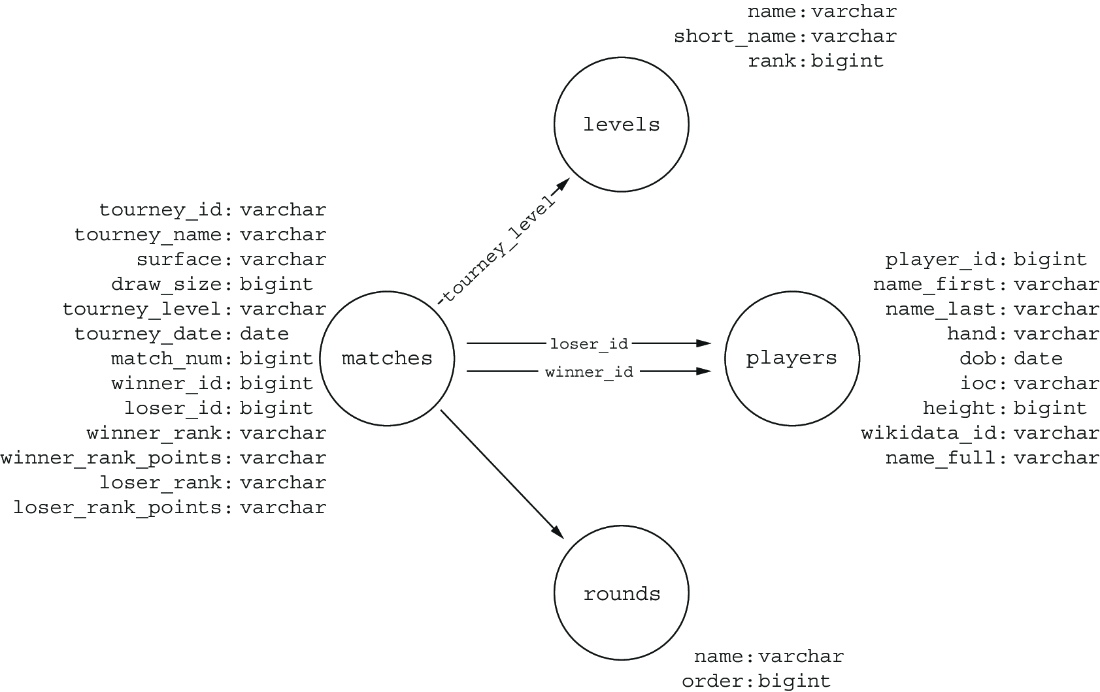
Use the ATP database schema to trace the tables joined by the application when retrieving match history and player statistics. section 9.1








