A Style groups property setters for a target control type so views share a consistent appearance. Instead of setting colors, sizing, alignment, or backgrounds on every control, define them once in a resource dictionary and let matching controls use them. This reduces repeated work and helps an app keep a recognizable visual language across platforms. section 10.0 section 10.1.1
App templates load Colors.xaml and Styles.xaml into the app resource dictionary. A Style with TargetType="Button", for example, can use color resources in setters; changing the shared Primary or Secondary color then updates the appearance supplied by that style. Styles can also target Page to provide a common gradient background. section 10.1.1
Choose between two main ways to apply a Style:
- Use an implicit style, identified by its target type and no key, to affect every matching control in its scope. This is useful for app-wide defaults such as the standard Button appearance. section 10.1.1 section 10.4
- Use an explicit style, identified with x:Key, when only selected controls need the customization. Apply it through a view’s Style property with StaticResource. section 10.1.1 section 10.4
Style a count label
Define a keyed Label style with setters for FontSize, HorizontalOptions, VerticalOptions, and TextColor. Then apply it to a matching Label with Style="{StaticResource CountLabelStyle}". The label gets the shared formatting without placing each property value directly on the control. section 10.1.1
Figure 10.5 Control property values are applied hierarchically, with app-level styles applied by default, page-level styles overriding app-level styles, and values set directly on controls overriding any styles.
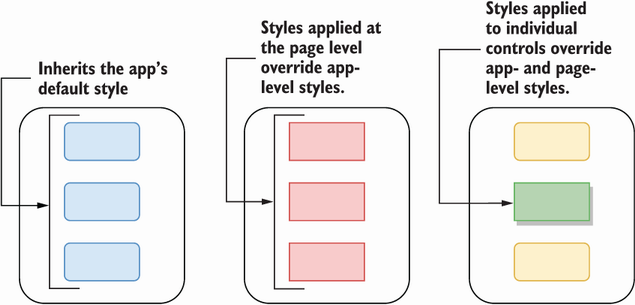
Property values resolve by scope and specificity: app-level styles provide defaults, page-level styles override them, and direct control values override styles. section 10.1.1
Styles work with themes and state-based appearance. AppThemeBinding in a setter supplies different values when the operating system uses light or dark mode. A style can also contain VisualStateManager configuration, such as setting a CollectionView item’s selected background to a themed resource. Common visual states include Normal, Selected, Disabled, Focused, and PointerOver. section 10.1.2 section 10.2.2 section 10.4
Prefer styles for repeated visual rules, use explicit styles for intentional exceptions, and set a property directly only when that single view must win over the shared design. Put reusable resources at app scope for broad consistency, or narrow their scope when a page or layout needs a different treatment. section 10.1.1 section 10.4






